
A website is made up of many components such as source code, databases, text, images, videos, and other multimedia elements. Each of these components has a certain size measured in bytes. The total size of all these elements is referred to as website size.
Website size always has limits. When the total size approaches those limits, website loading speed slows down, performance becomes unstable, user experience drops, bounce rates increase, and conversions decline.
So how can you solve this problem effectively?
Below are 15 proven ways to optimize website size and significantly improve loading speed.
Why Is Website Size Optimization Important?
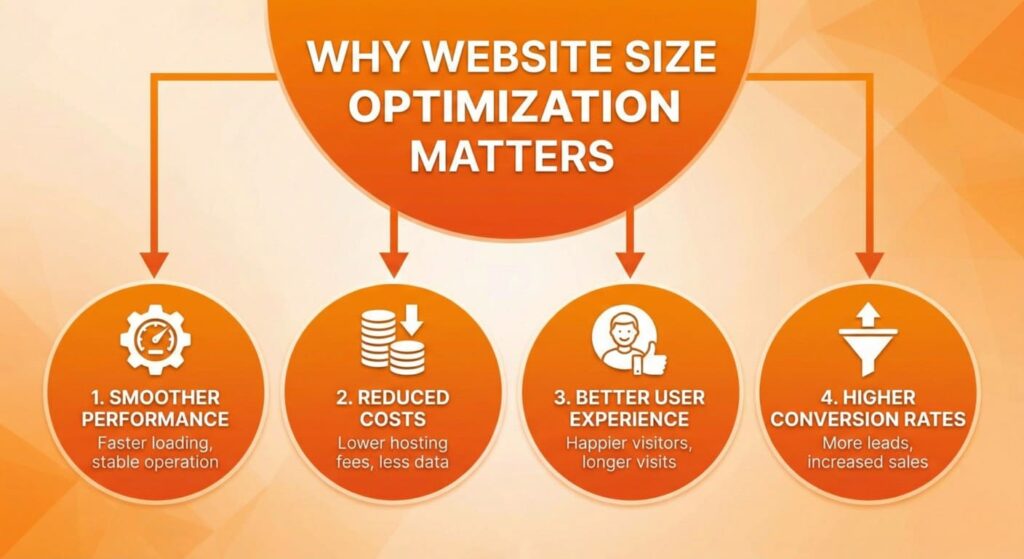
Website size optimization is often associated with faster loading speed, but in reality, its impact goes far beyond performance alone. Optimizing website size directly affects system stability, operating costs, user behavior, and revenue growth. Below is a deeper explanation of why this factor is critical for any serious website.
1. Smoother Website Performance and Long-Term Stability
A lightweight website places significantly less strain on the server. When source code, media files, and databases are optimized, the server processes requests faster and more efficiently, reducing the risk of crashes, timeouts, or unexpected downtime.
From a technical perspective, smaller websites are:
- Easier to migrate between servers or hosting providers
- Faster to back up and restore during emergencies
- Less prone to conflicts caused by bloated code or legacy files
In practice, many websites with relatively little content still occupy tens of gigabytes of storage. This is usually caused by:
- Unused themes and plugins
- Old media files and backups
- Excessive database revisions and log files
Over time, this unnecessary data accumulation leads to slower performance and higher maintenance complexity.
2. Reduced Hosting and Infrastructure Costs
Hosting providers charge based on storage space, bandwidth usage, and server resources. As a website grows, unoptimized assets consume storage faster than expected, forcing businesses to upgrade hosting plans earlier than necessary.
By optimizing website size, businesses can:
- Extend the lifespan of their current hosting package
- Reduce bandwidth consumption
- Avoid unnecessary server upgrades
In large-scale websites, even small reductions in file size can lead to significant cost savings over time, especially when traffic volume increases.
See More: Best Web Design Agency In Singapore 2025 – Top Picks & Guide
3. Better User Experience and Engagement
Website speed is a critical factor in user experience. A lightweight website loads quickly and responds instantly to user interactions, creating a smooth and frustration-free browsing experience.
From a behavioral standpoint:
- Users expect pages to load within seconds
- Delays create frustration and reduce trust
- Slow response times discourage exploration and interaction
Research consistently shows that users abandon slow websites before engaging with content, filling out forms, or making purchases. Even high-quality content loses its value if users cannot access it quickly.
4. Higher Conversion Rates and Business Performance
Website performance directly influences conversion rates. Slow-loading websites create poor first impressions, weaken brand credibility, and signal unreliability to potential customers.
According to research by Orange Valley, a 1-second delay in page load time can reduce conversion rates by more than 25%. This means:
- Fewer form submissions
- Lower sales revenue
- Reduced return on marketing investment
For businesses running paid ads, slow websites are especially damaging, as every click becomes more expensive while delivering lower conversion results.
See More: Website Design Price Guide 2025 | How Much Does It Really Cost?
15 Effective Ways to Optimize Website Size
1. Choose High-Quality, Fast Hosting
Website performance optimization starts at the infrastructure level. No matter how well your website is optimized, poor hosting will limit speed, stability, and scalability.
Before building or migrating a website, it is essential to estimate storage and resource requirements based on:
- Source code and frameworks
- Blog posts, pages, and dynamic content
- Images, videos, and media files
- Landing pages, plugins, and advanced features
Beyond storage capacity, high-quality hosting plays a critical role in:
- Faster server response time
- Better handling of traffic spikes
- Improved uptime and reliability
- Stronger security against malware and attacks
Low-cost or overcrowded shared hosting often leads to slow page loading, frequent downtime, and limited server resources. Choosing a reputable hosting provider with optimized servers, SSD storage, and proper caching mechanisms forms the technical foundation of long-term website performance.
2. Reduce HTTP Requests
Every element on a webpage—images, JavaScript files, CSS stylesheets, fonts, and icons—requires a separate HTTP request. Studies show that up to 80% of page load time is spent fetching these assets, not loading the HTML itself.
Excessive HTTP requests significantly slow down websites, especially on mobile devices and slower networks.
Effective ways to reduce HTTP requests include:
- Simplifying page layouts and design elements
- Combining multiple CSS files into one
- Reducing and deferring unnecessary JavaScript
- Replacing decorative images with CSS effects when possible
- Loading non-critical scripts at the bottom of the page
By minimizing HTTP requests, browsers can render pages faster, resulting in improved loading speed and better user experience.
Learn more about our website design services.
3. Optimize Website Images
Images are often the largest contributors to website size, accounting for over 60% of total page weight on many websites. Unoptimized images can severely impact loading speed, especially on image-heavy pages such as landing pages, portfolios, or eCommerce product listings.
Effective image optimization involves:
- Compressing images without noticeable quality loss
- Using appropriate formats such as JPEG for photos and PNG for graphics
- Avoiding outdated and heavy formats like BMP and TIFF
- Serving images at the exact dimensions required by the layout
Uploading oversized images and relying on CSS or HTML to resize them wastes bandwidth and slows down page loading. Proper image optimization significantly reduces file size while maintaining visual quality.
See More: Best Web Developer Singapore | Build Fast, Secure & SEO-Friendly Websites
4. Enable Gzip Compression
Gzip compression reduces the size of website files before they are transferred from the server to the browser. This process compresses HTML, CSS, JavaScript, and text-based files, resulting in faster data transmission.
Key benefits of enabling Gzip include:
- Reduced bandwidth usage
- Faster page loading times
- Improved server response efficiency
Most modern browsers support Gzip by default, and when properly configured, it can reduce page size by up to 70%. This makes Gzip one of the most effective and easiest performance optimization techniques to implement.
5. Enable Browser Caching
Browser caching allows static resources—such as images, CSS files, JavaScript, and fonts—to be stored locally on a user’s device after the first visit.
When a visitor returns to the website, the browser loads these cached files instead of requesting them again from the server. This significantly reduces:
- Page load time
- Server requests
- Bandwidth consumption
From a performance perspective, browser caching improves both actual loading speed and perceived speed, especially for returning users. Proper cache configuration ensures faster navigation across pages and creates a smoother, more consistent browsing experience.
6. Minify HTML, CSS, and JavaScript
Websites often contain unnecessary code such as comments, whitespace, line breaks, and redundant syntax. While these elements improve readability for developers, they increase file size and slow down loading time.
Minification removes these unnecessary characters without affecting functionality, resulting in:
- Smaller file sizes
- Faster file delivery
- Reduced bandwidth usage
Common tools used for code optimization include:
- Google PageSpeed Insights
- CSSMin for CSS files
- JSMin for JavaScript files
- Google Closure Compiler for advanced JavaScript optimization
Minifying code is a foundational step in reducing website size and improving performance efficiency.
See More: How Google Ranks Keywords: In-Depth Explanation of Ranking Factors
7. Improve Server Response Time
Server response time refers to how quickly a server responds to a browser request. Google recommends a response time of under 200 milliseconds for optimal performance.
Slow server response time is often caused by:
- Heavy databases
- Inefficient backend code
- Overloaded hosting environments
- Lack of caching mechanisms
Performance monitoring tools such as Google PageSpeed Insights, GTmetrix, and YSlow help identify bottlenecks that delay server responses. Addressing these issues ensures faster content delivery and improved user satisfaction.
8. Prioritize Above-the-Fold Content
Above-the-fold content refers to the portion of a webpage visible to users without scrolling. Loading this content first is critical for perceived performance.
By prioritizing essential content and deferring non-critical CSS and JavaScript:
- Users can see meaningful content immediately
- Page interaction feels faster
- Bounce rates are reduced
Even if the entire page is not fully loaded, users are more likely to stay and engage when visible content appears quickly.
9. Clean Up WordPress Installation
Over time, WordPress websites accumulate unnecessary data that increases database size and slows performance. These include:
- Unused themes and plugins
- Old backups and temporary files
- Drafts, revisions, and spam comments
Regular cleanup helps:
- Reduce overall website size
- Improve database efficiency
- Speed up queries and backups
A clean WordPress installation is easier to maintain and significantly improves long-term performance.
See More: 10+ Most Important Google Algorithms in 2026
10. Reduce the Number of Plugins
While plugins extend functionality, excessive plugins increase page size, generate additional HTTP requests, and create security vulnerabilities.
Each plugin may:
- Load extra scripts and styles
- Add database queries
- Slow down page rendering
The best practice is to keep only essential plugins that deliver real value. Replacing multiple plugins with lightweight, multifunction solutions can dramatically improve website speed and stability.
11. Reduce Page Redirects
Each page redirect creates an additional HTTP request, increasing load time and delaying content delivery. Multiple redirects can significantly slow down websites, especially on mobile devices and slower networks.
Common causes of excessive redirects include:
- HTTP to HTTPS redirection chains
- Desktop-to-mobile intermediate redirects
- Incorrect internal linking
Google recommends:
- Avoiding unnecessary or chained redirects
- Using direct mobile URLs when applicable
- Implementing proper rel=”alternate” tags so Google can understand mobile and desktop versions correctly
Reducing redirects helps browsers reach the final destination faster, improving both loading speed and crawl efficiency.
12. Optimize the Database
Databases store all website content, settings, and user data. As websites grow, databases often accumulate unnecessary records that consume storage and slow down performance.
Common sources of database bloat include:
- Junk or orphaned data
- Unused or abandoned tables
- Old system logs
- Expired or outdated content
Regular database optimization helps:
- Reduce storage usage
- Speed up queries
- Improve backup and restore processes
A lean database allows the server to retrieve data faster, directly improving website responsiveness.
See More: Top Tips for Website Design in Singapore: Boost Your Business Online
13. Use SSL (HTTPS)
HTTPS encrypts data exchanged between the browser and the server, protecting sensitive information from interception.
Beyond security, HTTPS also:
- Enables faster connections through modern protocols
- Improves trust and credibility
- Enhances SEO performance
Google officially treats HTTPS as a ranking signal, meaning websites without SSL are at a disadvantage in search results. Implementing SSL is now a standard requirement rather than an optional upgrade.
14. Remove Flash Content
Flash is an outdated technology that is no longer supported by modern browsers. It introduces security vulnerabilities, increases page weight, and prevents search engines from properly crawling content.
Flash-based elements:
- Slow down page loading
- Reduce compatibility across devices
- Negatively impact SEO
Modern technologies such as HTML5, CSS3, and JavaScript provide the same interactive features with better performance, security, and search engine friendliness.
15. Use External Media & Cloud Services
Hosting large media files directly on your server increases storage usage and bandwidth consumption. Offloading these assets to external platforms helps reduce website size and server load.
Effective strategies include:
- Hosting videos on platforms like YouTube or Vimeo
- Using cloud-based services for common scripts and libraries
- Removing unnecessary log files from hosting environments
- Limiting user uploads when they are not essential
Using external media and cloud services allows your website to remain lightweight, scalable, and easier to maintain.
See More: How to Check Website Credibility Using Quick Online Tools
Looking for a professional website that converts visitors into customers?
Our team provides professional website design services in Singapore tailored to your business goals.
Contact us to schedule a free consultation and explore the right solution for your brand.
What is website size optimization?
Website size optimization reduces the total file size of a webpage’s assets—like images, CSS, JavaScript, HTML, and fonts—to improve loading speeds and user experience. Smaller page sizes lead to faster performance, better SEO rankings, and lower bounce rates, as search engines like Google prioritize quick-loading sites.
Key Benefits
Faster load times enhance mobile user satisfaction and conversion rates, with studies showing even a one-second delay can reduce conversions by 7%. Optimized sites also cut bandwidth costs and support better scalability for high traffic.
Main Techniques
- Compress and resize images using tools like TinyPNG to remove excess data without quality loss.
- Minify CSS, JavaScript, and HTML by stripping whitespace, comments, and unused code.
- Enable gzip compression and browser caching to shrink transfer sizes and reuse assets.
Best Practices
Limit third-party scripts and custom fonts, which often bloat page weight. Use content delivery networks (CDNs) to serve files from locations closer to users, further reducing latency. Test optimizations with tools like Google PageSpeed Insights for measurable improvements.
Does smaller website size improve SEO?
Yes, smaller website size improves SEO by enhancing page load speed, which Google has confirmed as a direct ranking factor since 2010. Faster-loading pages reduce bounce rates, boost user engagement metrics, and align with Core Web Vitals like Largest Contentful Paint. This effect is especially pronounced on mobile devices, where slower connections amplify the impact of bloated pages.
Core Mechanisms
Page speed influences SEO through user experience signals, such as lower abandonment rates on quick sites versus delays that frustrate visitors. Search engines crawl and index faster pages more efficiently, prioritizing them in results for competitive queries.
Evidence from Studies
Google data shows pages loading under 2-3 seconds see 32% lower bounce rates, directly correlating to higher rankings. Optimizing size via compression can improve rankings by up to 7% in speed-sensitive niches.
Optimization Impact
Reducing page weight from 3MB to under 1MB often lifts mobile rankings significantly, as seen in real-world tests. Tools like PageSpeed Insights quantify this, rewarding sites with scores above 90.
What usually causes a website to become heavy?
Websites become heavy primarily due to unoptimized assets and inefficient code that inflate total page weight, often exceeding 2MB on average for top sites. This bloat slows loading, raises bounce rates, and harms SEO, as discussed in prior optimizations.
Top Culprits
- Large images and media: Uncompressed photos, videos, or GIFs dominate page size, sometimes accounting for over 50% of total weight.
- Excessive JavaScript and CSS: Bloated scripts from frameworks, third-party trackers, or unminified files add unnecessary kilobytes.
- Poorly coded plugins/themes: These generate redundant DOM nodes, nested elements, or hidden formatting from copy-pasted content.
Other Contributors
Dynamic features like sliders, review widgets, or page builders create complex HTML structures that overwhelm browsers. Multiple fonts, embeds, and unoptimized eCommerce elements further compound the issue over time.
How much do images affect website size?
Images significantly inflate website size, often accounting for 60-70% of a typical page’s total weight on modern sites. Unoptimized photos, high-resolution graphics, and multiple media files per page compound this, turning a lean 500KB site into a bloated 3MB+ load.
Typical Impact Stats
Average desktop pages weigh around 2.1MB, with images comprising over 1MB—more than HTML, CSS, and JavaScript combined. Mobile pages fare worse, as full-size desktop images get served without adaptation, spiking data usage by 50% or more.
Why Images Dominate
High-res JPEGs or PNGs from cameras easily exceed 5MB each before compression, while galleries with 10+ images can push pages beyond 10MB. Videos embedded as image thumbnails or unlazy-loaded visuals further escalate this, delaying render times by seconds.
Is Gzip compression safe to use?
Gzip compression is generally safe for website use and widely recommended for reducing file transfer sizes by 70-90%, improving load speeds without compromising data integrity. Modern servers like Apache and Nginx implement it securely by default, and browsers handle it natively.
Known Risks
The primary concern stems from the BREACH attack (2013), which exploits gzip over HTTPS to potentially leak sensitive data like CSRF tokens through compression patterns, but this requires specific conditions like repeated requests and compressible secrets. CRIME (TLS-level) is obsolete since browsers disabled TLS compression years ago.
Safe Practices
Exclude sensitive pages or headers (e.g., auth tokens) from compression via server configs, and use alternatives like Brotli for better ratios with fewer issues. No widespread exploits target standard web gzip today, making it low-risk for static assets like HTML/CSS/images.
How often should I clean my WordPress database?
Clean your WordPress database weekly for small to medium sites or bi-weekly for larger, high-activity ones to prevent bloat from revisions, transients, and spam. High-traffic or frequently updated sites benefit from monthly optimizations using plugins like WP-Optimize for automated scheduling.
Factors Influencing Frequency
Site size and update volume dictate the schedule; low-activity blogs can manage quarterly cleanups, while eCommerce sites need more frequent attention to handle transients and logs. Always back up first to avoid data loss during cleanup.
Recommended Tools
Plugins such as Advanced Database Cleaner offer hourly to monthly automation for revisions, trash, and orphans. WP Rocket or WP-Sweep provide one-click options with scheduling for daily/weekly runs. Monitor via phpMyAdmin or tools like Query Monitor to assess when bloat accumulates.
Do too many plugins slow down a website?
Yes, too many WordPress plugins slow down websites by adding extra code, database queries, HTTP requests, and resource overhead that inflate page weight and processing time.
How Plugins Impact Speed
Poorly coded or bloated plugins execute inefficient database calls on every page load, even if unused, increasing server response times by milliseconds to seconds. They also load unnecessary CSS, JavaScript, and external resources site-wide, multiplying requests and contributing to larger page sizes alongside images and other assets discussed earlier.
Evidence from Tests
Real-world benchmarks show plugins like Yoast SEO adding 80ms per page, while lightweight ones add just 1ms; stacking 20+ plugins can double load times compared to lean setups. Feature-heavy themes amplify this, but plugin count alone correlates with higher TTFB and Core Web Vitals penalties affecting SEO.
Mitigation Tips
Audit with Query Monitor or P3 Plugin Profiler to deactivate resource hogs, limit to 10-15 essential plugins, and prioritize caching tools like WP Rocket to offset bloat. Regular database cleaning, as previously covered, complements this by removing plugin-generated transients.
Can hosting affect website size optimization?
Yes, web hosting significantly affects website size optimization efforts by influencing server-side compression, caching capabilities, and resource delivery efficiency. Poor hosting can undermine optimizations like gzip or image compression through slow response times or limited bandwidth, while premium hosts enable faster implementation of these techniques.
Key Hosting Factors
Server location and type matter: Hosts near your audience (e.g., Asia for HCMC users) with SSD storage, LiteSpeed, or Nginx reduce latency in serving optimized files. Shared hosting often throttles gzip effectiveness due to resource contention, unlike VPS or managed WordPress plans with built-in CDNs that shrink effective page size by 50%.
Performance Ties
Hosts supporting advanced caching (e.g., Redis) amplify size reductions from database cleanups and plugin limits discussed earlier, cutting TTFB and total payload. Low-quality hosts ignore Core Web Vitals, negating SEO gains from smaller sizes.
Recommendations
Choose hosts like SiteGround or Kinsta with automatic gzip/Brotli, image optimization, and global CDNs for Vietnam traffic. Test via GTmetrix to confirm hosting boosts your prior efforts on images and plugins.