

A Website Is Not “Just a Website”
From a professional agency’s perspective, a website is not a single product—it is an ecosystem.
Many business owners believe a website is simply:
- a few pages,
- some images,
- and a contact form.
In reality, a high-performing website is a system of interconnected components: technology, design, content, infrastructure, security, and marketing foundations—all working together to support business growth.
This A–Z guide is designed to give business owners, startups, and decision-makers a clear, structured understanding of everything a website needs to truly work, not just exist online.
A – Domain Name: Your Digital Identity
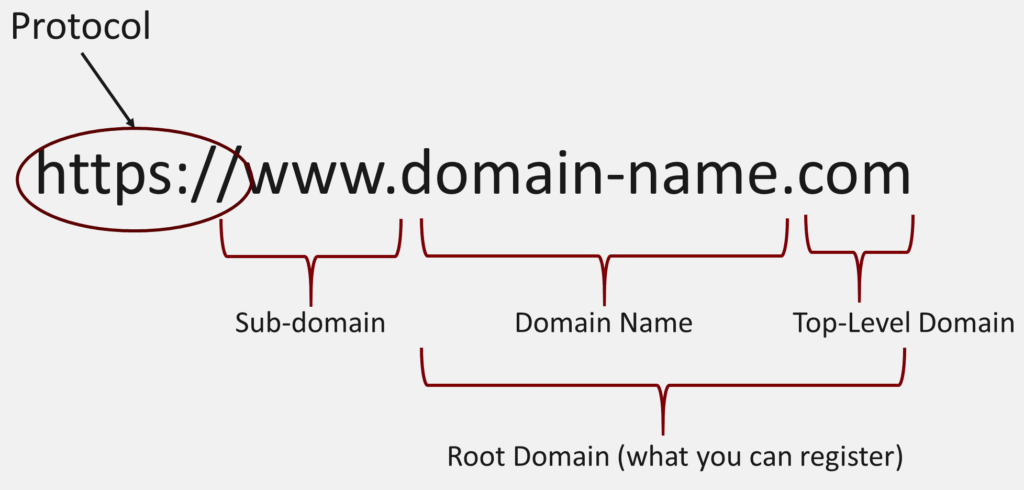
A domain name is far more than just a web address—it is the foundation of your digital identity and often the first point of contact between your brand and potential customers.
From a professional agency perspective, the right domain name plays a critical role in brand positioning, trust-building, and long-term digital growth.
Why the Domain Name Matters More Than You Think
Before users see your design, content, or services, they see your domain name—on Google search results, social media links, emails, and advertisements. This means your domain directly influences:
- first impressions,
- perceived credibility,
- click-through rates (CTR),
- memorability and brand recall.
A strong domain instantly signals professionalism. A weak or confusing one raises doubts before users even visit your website.
Key Characteristics of a Strong Domain Name
A well-chosen domain should be:
Easy to Remember
Short, clear domains reduce friction. If users struggle to spell or recall your domain, they are less likely to return or recommend your brand.
Aligned with Your Brand Identity
Your domain should clearly reflect your business name, industry, or core offering. Consistency across branding, domain, and messaging strengthens trust and recognition.
Trustworthy and Professional
Using clean, reputable domain extensions (such as .com, .sg, or industry-appropriate TLDs) increases user confidence—especially for businesses targeting corporate or B2B clients.
Domain Name and SEO: A Strategic Relationship
From an SEO standpoint, domain names still influence performance when used strategically:
- A clear, brand-aligned domain improves click-through rates in search results.
- Avoiding spammy or keyword-stuffed domains protects long-term SEO authority.
- A stable domain builds domain age and backlink equity over time—both critical ranking factors.
While exact-match domains are no longer a shortcut to rankings, brandable, authoritative domains consistently outperform low-quality alternatives.
The Long-Term Business Impact of Your Domain Choice
Choosing the wrong domain can quietly limit growth:
- unclear domains confuse users,
- unprofessional extensions reduce trust,
- frequent domain changes dilute SEO value and brand recognition.
From an agency viewpoint, your domain should be treated as a long-term asset, not a quick decision. Rebranding or migrating domains later often requires significant cost, SEO recovery time, and marketing effort.
Agency Recommendation
Professional agencies always advise clients to:
- secure their primary domain early,
- register variations to protect brand identity,
- think beyond today’s business size and plan for future expansion.
A domain name is not just where your website lives—it defines how your brand exists online.
See More: Website Design Price Guide | How Much Does It Really Cost?
B – Browser Compatibility: Consistency Builds Trust
From a professional agency standpoint, browser compatibility is a non-negotiable technical requirement, not a “nice-to-have” feature.
A high-quality website must function consistently across all major environments, including:
- Google Chrome
- Safari (especially critical for Apple devices)
- Microsoft Edge
- Mozilla Firefox
- Mobile browsers on iOS and Android
Why Browser Compatibility Matters to Business
Different browsers interpret code slightly differently. Without proper testing and optimization, this can lead to:
- broken layouts,
- unreadable text,
- malfunctioning forms,
- inconsistent design elements.
For users, these issues translate directly into lost trust. If a website looks broken or behaves unpredictably, visitors instinctively associate that experience with poor professionalism.
From a business perspective, even a small display issue can:
- increase bounce rates,
- reduce time on site,
- break conversion paths,
- result in lost leads or sales.
Browser Compatibility and Conversion Rates
Many conversion points—such as contact forms, checkout processes, and call-to-action buttons—depend on consistent browser behavior.
A form that works perfectly in Chrome but fails in Safari can silently block:
- enquiries,
- sign-ups,
- transactions.
Professional agencies treat cross-browser testing as part of conversion optimization, not just technical QA.
Agency Best Practice
A professionally built website is:
- tested across browsers and devices,
- built with clean, standards-compliant code,
- optimized for both desktop and mobile environments.
Browser compatibility protects your brand reputation and ensures every potential customer gets the same high-quality experience, regardless of how they access your site.
See More: Web Design Singapore: Top 5 Professional Web Design Companies
C – Content Strategy: Not Just Content, but Communication
From an agency perspective, content is not about filling pages with text—it is about communicating value with intent.
A website without a clear content strategy is simply a digital brochure. A website with strategy becomes a sales and marketing engine.
What Effective Website Content Actually Does
High-performing content should:
Answer Real User Questions
Content must be written for humans first. It should address real problems, concerns, and motivations users have when they search online.
Match Search Intent
Successful content aligns with why users are searching—not just what they are searching for. Informational, commercial, and transactional intent each require different content approaches.
Guide Visitors Toward Action
Every page should have a purpose: educate, persuade, or convert. Content should naturally lead users toward the next step, whether that’s contacting your team or requesting a quote.
Content as the Foundation of SEO and Trust
From an agency viewpoint, content supports three core pillars:
SEO Performance
Search engines rank pages that provide clear, relevant, and structured information. Without strong content, even technically perfect websites struggle to rank.
Trust and Authority
Well-written content positions your brand as knowledgeable and credible. This is especially critical for service-based and B2B businesses.
Lead Conversion
Content builds confidence before users ever speak to your sales team. In many cases, your content does the selling long before a form is submitted.
Why Design Alone Is Not Enough
A visually impressive website with weak content often fails to perform. Without clear messaging:
- users feel confused,
- value propositions are unclear,
- conversion rates drop.
Professional agencies treat content strategy as a core part of website planning, not something added after design.
See More: Best Web Design Agency In Singapore – Top Picks & Guide
D – Design That Supports Business Goals
From a professional web agency’s perspective, design is a business tool, not decoration.
While visual appeal matters, effective website design is ultimately measured by how well it supports business objectives—not how “pretty” it looks.
Beyond Aesthetics: What Professional Design Really Focuses On
High-performing web design is built around four core principles:
Clarity
Users should immediately understand:
- who you are,
- what you offer,
- why it matters to them.
Clear messaging, readable typography, and well-structured layouts reduce cognitive load and keep users engaged.
Usability
Professional design prioritizes ease of use. Navigation, buttons, forms, and content flow must feel intuitive across all devices. If users have to “figure things out,” the design has failed.
Visual Hierarchy
Visual hierarchy guides attention. Strategic use of spacing, contrast, and layout helps users focus on the most important elements—such as value propositions and calls-to-action—at the right time.
Conversion Flow
Every page should support a logical journey, leading users toward a defined action. Design should remove friction, not create distractions.
Design as a Brand Positioning Tool
From an agency standpoint, design communicates your brand long before a single word is read.
Consistent visual language:
- reinforces credibility,
- signals professionalism,
- differentiates your business from competitors.
Poor or outdated design can subconsciously suggest:
- lack of expertise,
- low-quality service,
- unreliable operations.
Why “Beautiful but Ineffective” Design Fails
A common mistake is prioritizing aesthetics over function. Websites that look impressive but lack strategic structure often suffer from:
- low engagement,
- high bounce rates,
- poor conversion performance.
Professional design succeeds when it balances beauty with purpose. If a website does not convert visitors into leads or customers, it is not successful—regardless of how it looks.
See More: How to Check Website Credibility Using Quick Online Tools
E – Email & Form Infrastructure: Where Conversions Actually Happen
From a business and agency perspective, forms are not just technical features—they are direct revenue channels.
In many cases, a website’s primary goal is to capture:
- enquiries,
- consultation requests,
- demo bookings,
- sales leads.
If forms fail, the website fails.
What a Proper Form Setup Includes
A professional email and form infrastructure should cover:
Secure Form Handling
User data must be protected through secure connections and proper server-side processing to prevent data leaks or breaches.
Spam Protection
Without adequate protection (such as validation rules or filtering), inboxes become flooded with junk—causing real enquiries to be missed or ignored.
Reliable Email Delivery
Form submissions must reach the right people, consistently. Poor email configuration can cause messages to land in spam folders or disappear entirely.
Integration with Business Systems
For growing businesses, forms should connect seamlessly with:
- CRM systems,
- email marketing platforms,
- internal workflows.
This ensures leads are tracked, followed up, and nurtured efficiently.
The Hidden Cost of Broken Forms
From an agency standpoint, broken or misconfigured forms are one of the most expensive website issues—because they often go unnoticed.
A form that looks functional but fails to send emails can result in:
- missed sales opportunities,
- frustrated potential clients,
- inaccurate performance data.
Unlike visible design issues, form problems silently drain revenue.
Agency Best Practice
Professional agencies:
- test all forms across browsers and devices,
- monitor email deliverability,
- set up backups and notifications,
- validate data before submission.
A website should never leave conversions to chance.
See More: Best Web Developer Singapore | Build Fast, Secure & SEO-Friendly Websites
F – Front-End Development: Where User Experience Comes to Life
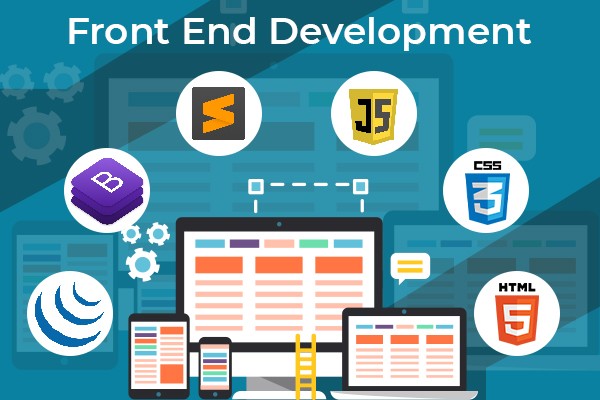
From a professional agency perspective, front-end development is where strategy, design, and technology meet the user.
Everything a visitor sees, clicks, scrolls, or interacts with on a website is controlled by the front-end. This layer determines not only how a website looks—but how it feels to use.
What Front-End Development Actually Controls
Front-end development is responsible for:
- page layout and structure,
- responsiveness across screen sizes,
- animations and micro-interactions,
- navigation behavior and interactive elements.
It transforms design concepts into a living, functional interface that users can intuitively interact with.
Core Front-End Technologies
Professional front-end development is built on three foundational technologies:
HTML (Structure)
Defines the structure and meaning of content. Clean HTML helps search engines understand your pages and improves accessibility.
CSS (Presentation)
Controls visual styling, layout, spacing, and responsiveness. Well-written CSS ensures consistency and adaptability across devices.
JavaScript (Interaction)
Adds interactivity and dynamic behavior—such as sliders, dropdowns, form validation, and real-time feedback.
Together, these technologies create a seamless user interface when implemented correctly.
Why Clean Front-End Code Matters to Business
From an agency standpoint, front-end code quality directly impacts performance and conversions.
Clean, optimized front-end code results in:
- faster page loading,
- smoother interactions,
- better accessibility for all users,
- consistent user experience across devices and browsers.
Poorly written front-end code, on the other hand, can cause:
- slow load times,
- layout issues,
- broken interactions,
- frustrated users who leave before converting.
Front-End Development and SEO
Search engines evaluate user experience signals such as:
- page speed,
- mobile usability,
- layout stability.
Well-built front-end development supports SEO by improving these metrics—making it a critical ranking factor, not just a design concern.
See More: 10 Best Website Design & Development Companies 2026
G – Back-End Development & Logic: The Engine Behind the Scenes
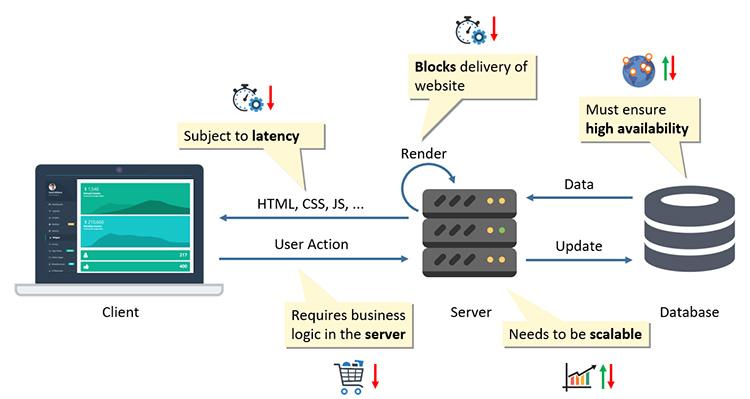
If the front-end is what users see, the back-end is what makes everything work.
From an agency perspective, back-end development is the backbone of scalability, security, and long-term stability.
What the Back-End Handles
Back-end systems manage:
- data processing and storage,
- user authentication and permissions,
- database operations,
- application logic and workflows.
It ensures that information moves securely and efficiently between the server, database, and front-end interface.
Common Back-End Technologies
Professional websites often rely on technologies such as:
- PHP for content-driven and CMS-based systems,
- Python for data-driven and scalable applications,
- Node.js for real-time and high-performance solutions,
- MySQL / PostgreSQL for structured data storage and management.
The choice of technology depends on business requirements—not trends.
Why a Strong Back-End Is Critical for Growth
From a business standpoint, a weak back-end can:
- limit future features,
- slow down performance,
- expose security vulnerabilities,
- require costly rebuilds later.
A well-architected back-end ensures:
- scalability as traffic increases,
- data security and integrity,
- smooth integrations with third-party systems,
- long-term flexibility.
See More: 10+ Most Important Google Algorithms
H – Hosting & Server Environment: The Foundation of Website Performance

From a professional web agency’s perspective, hosting is not just where your website “lives”—it is the technical foundation that determines how reliably and efficiently your website operates.
No matter how well a website is designed or developed, poor hosting can undermine the entire investment.
Why Hosting Quality Matters
Hosting quality directly impacts several critical business factors:
Page Speed
The server’s performance affects how quickly your website responds to user requests. Slow servers increase loading times, frustrate users, and reduce conversion rates.
Uptime and Reliability
Frequent downtime means your website is inaccessible—resulting in lost leads, missed sales, and damaged brand credibility.
Security
Low-quality hosting environments often lack proper security measures, making websites more vulnerable to attacks, malware, and data breaches.
SEO Performance
Search engines favor fast, reliable websites. Poor hosting can negatively affect crawlability, rankings, and Core Web Vitals scores.
The Hidden Cost of Cheap Hosting
From an agency standpoint, low-cost hosting often leads to:
- overloaded servers with limited resources,
- inconsistent performance during traffic spikes,
- outdated server software,
- weak security configurations.
While cheap hosting may seem cost-effective initially, it often results in higher long-term costs due to:
- performance issues,
- SEO losses,
- emergency fixes,
- forced migrations.
Professional Hosting for Professional Websites
Agency-recommended hosting typically includes:
- optimized server configurations,
- scalable resources,
- regular backups,
- proactive security monitoring,
- performance caching and CDN integration.
Professional hosting ensures your website remains fast, stable, and secure—supporting business growth rather than limiting it.
See More: How to Get Your Content to Appear in Google’s AI Overview
I – Image & Media Optimization: Performance Without Compromise
Images and media play a crucial role in engaging users, communicating value, and supporting brand storytelling. However, unoptimized media is one of the most common causes of slow websites.
From an agency perspective, media optimization is a balance between visual quality and technical efficiency.
Why Media Optimization Is Essential
Large, uncompressed images increase:
- page load times,
- server load,
- bounce rates.
Users expect fast-loading pages. Even a one-second delay can significantly reduce engagement and conversions.
Best Practices for Image & Media Optimization
Professional optimization includes:
Correct Dimensions
Images should be resized to match their display size. Uploading oversized images wastes bandwidth and slows loading.
Compressed File Sizes
Reducing file size without visible quality loss improves performance while maintaining visual impact.
Modern Image Formats
Formats like WebP deliver smaller file sizes with better quality, improving both speed and compatibility.
Descriptive Alt Text
Alt text improves accessibility and helps search engines understand image content—supporting SEO.
Media Optimization and SEO
Search engines evaluate page speed and user experience metrics heavily. Optimized media contributes directly to:
- better Core Web Vitals scores,
- improved rankings,
- enhanced image search visibility.
From an agency standpoint, image optimization is not optional—it is a fundamental SEO requirement.
Learn more about our website design services.
J – JavaScript & Interactivity
From a professional agency’s perspective, JavaScript is a powerful tool—but only when used with clear intent and restraint.
JavaScript enables modern websites to feel dynamic and responsive by powering:
- interactive user interfaces,
- animations and transitions,
- real-time form validation,
- dynamic content loading.
When implemented correctly, JavaScript enhances usability and engagement. When misused, it becomes a performance liability.
The Risk of Overusing JavaScript
Over-reliance on JavaScript can negatively impact:
- page load speed,
- search engine crawlability,
- accessibility for users with assistive technologies.
Heavy scripts can delay content rendering, frustrate users, and reduce visibility in search results—especially on mobile devices or slower networks.
JavaScript and SEO Considerations
Search engines can process JavaScript, but not all scripts are treated equally. Poorly optimized JavaScript can:
- block content from being indexed properly,
- increase time to first render,
- negatively affect Core Web Vitals metrics.
From an agency standpoint, JavaScript should support content—not hide it.
Agency Best Practice
Professional agencies:
- minimize unnecessary scripts,
- defer or lazy-load JavaScript where appropriate,
- ensure critical content loads without dependency on heavy scripts,
- test performance across devices and network conditions.
The goal is always balance: rich interactivity without compromising speed, SEO, or accessibility.
See More: Best Professional Web Design Services in Singapore
K – Keywords & SEO Foundations
SEO is not something added after a website is built—it is embedded into the foundation from day one.
From an agency perspective, SEO defines how easily potential customers can find your website when they search online.
Core Components of Strong SEO Foundations
Effective SEO begins with:
Keyword Research
Understanding how users search—and what terms they use—guides content creation, page structure, and navigation.
Site Structure
A clear, logical structure helps both users and search engines understand your website. It improves crawl efficiency and user experience.
Internal Linking
Strategic internal links distribute authority across pages and guide users toward important content.
Metadata Optimization
Titles and meta descriptions influence click-through rates and help search engines interpret page relevance.
Why SEO Cannot Be an Afterthought
Websites built without SEO foundations often require:
- costly redesigns,
- content rewrites,
- technical fixes.
Even the best-designed websites fail if users can’t find them. From an agency standpoint, SEO ensures your website is visible, discoverable, and competitive.
Learn more about our Website Development
L – Loading Speed & Performance
Website speed is both a ranking factor and a conversion driver.
Users expect fast-loading websites. Search engines reward them.
The Business Impact of Website Speed
A fast website:
- ranks higher in search results,
- keeps users engaged longer,
- reduces bounce rates,
- increases conversion rates.
Even minor performance improvements can lead to measurable business gains.
Professional Performance Optimization Techniques
Agency-level optimization includes:
Caching
Storing frequently accessed data to reduce server load and speed up delivery.
Code Minification
Reducing file sizes by removing unnecessary code improves load times.
Image Compression
Optimized media reduces page weight without sacrificing visual quality.
Server Tuning
Optimizing server configurations ensures efficient request handling.
See More: What Is a Website? How Does a Website Work?
M – Mobile-First Responsiveness
From a professional agency perspective, mobile responsiveness is no longer a feature—it is the default starting point for modern website design.
With more than half of global web traffic coming from mobile devices, websites that fail on mobile fail at their most critical touchpoint.
Why Mobile-First Design Matters
Mobile-first responsiveness ensures websites are:
- easier to navigate on small screens,
- faster to load on mobile networks,
- more intuitive for touch interactions.
Search engines, especially Google, prioritize mobile-friendly websites through mobile-first indexing, meaning the mobile version of your site directly influences rankings.
Mobile and Conversion Performance
From a business standpoint, mobile users are often:
- researching services,
- comparing providers,
- making quick decisions.
If mobile navigation is confusing or slow, users abandon the site immediately—often without returning.
Professional mobile-first design focuses on:
- simplified layouts,
- clear calls-to-action,
- thumb-friendly navigation,
- fast load times.
Agency Best Practice
Agencies design for mobile first, then enhance for larger screens. This approach ensures clarity, performance, and usability across all devices.
N – Navigation & Information Architecture: Guiding Users to the Right Outcome
Navigation is not just a menu—it is the roadmap of your website.
From an agency perspective, clear navigation is essential for both user experience and search engine efficiency.
Why Navigation Structure Matters
Effective navigation helps users:
- understand your offerings quickly,
- locate relevant information without frustration,
- move naturally toward conversion points.
Poor navigation increases:
- confusion,
- bounce rates,
- abandonment.
Navigation and SEO
Search engines rely on clear site structure to:
- crawl pages efficiently,
- understand page relationships,
- distribute ranking authority.
A well-planned information architecture improves both visibility and usability.
Agency Best Practice
Professional agencies:
- map content hierarchies before design,
- limit menu complexity,
- use clear, descriptive labels,
- support navigation with internal linking.
Clear navigation turns visitors into engaged users.
See More: SEO vs SEM Explained: When Should You Run Ads and When Should You Invest in SEO?
O – Ongoing Maintenance & Updates: Protecting Long-Term Value
From an agency standpoint, a website is never truly finished.
Websites are living systems that require continuous care to remain secure, functional, and competitive.
What Ongoing Maintenance Includes
Professional website maintenance covers:
- regular software and CMS updates,
- security patches to prevent vulnerabilities,
- automated and manual backups,
- performance monitoring and optimization.
Neglecting maintenance increases the risk of downtime, security breaches, and degraded performance.
Maintenance as Risk Management
From a business perspective, maintenance:
- protects your investment,
- reduces unexpected failures,
- ensures long-term stability.
Websites that are not maintained often become expensive to fix later.
P – Protection, Security & Trust Signals: Safeguarding Your Brand
Security is not just technical—it is about trust.
From an agency viewpoint, users expect websites to protect their data and privacy by default.
Essential Security Components
Professional websites should include:
- SSL certificates for encrypted communication,
- firewalls to block malicious traffic,
- regular backups for recovery,
- secure authentication systems.
These elements reassure users and protect business data.
The Cost of Security Failures
A compromised website can result in:
- data loss,
- SEO penalties,
- reputational damage,
- loss of customer trust.
From an agency perspective, security is not optional—it is fundamental.
See More: How to Use WordPress for Business Websites: The Ultimate Guide
Q – Quality Assurance (QA): Ensuring Everything Works Before It Matters
From a professional agency perspective, Quality Assurance is the final safeguard before a website goes live—and often the difference between a smooth launch and costly post-launch issues.
What Professional QA Really Involves
Before launch, agencies systematically test:
- contact and conversion forms to ensure submissions are received correctly,
- responsiveness across screen sizes and devices,
- compatibility across major browsers,
- page speed and performance benchmarks,
- broken links, missing assets, and layout inconsistencies.
QA is not about perfection—it is about reliability and risk reduction.
Why QA Matters to Business
A website that launches with errors:
- damages credibility immediately,
- frustrates early users,
- generates support issues.
From an agency standpoint, QA protects your brand during its most visible moment—launch day.
R – Reporting & Analytics: Turning Data into Decisions
Data is the foundation of continuous improvement.
Professional websites are built with analytics from day one to ensure every decision is informed, not assumed.
What Analytics Track
Analytics tools monitor:
- traffic sources and volume,
- user behavior and navigation paths,
- conversion performance,
- technical and performance issues.
These insights reveal what works—and what doesn’t.
Why Analytics Are Critical
Without data:
- optimization is guesswork,
- marketing spend is inefficient,
- growth opportunities are missed.
From an agency view, analytics transform websites from static assets into measurable growth platforms.
See More: SEO Image Optimization A–Z: How to Compress Images Under 100KB
S – Scalability for Future Growth: Building for What Comes Next
A professional website is not built only for today—it is designed for future expansion.
What Scalability Enables
Scalable websites can support:
- additional pages and content,
- new features and functionalities,
- increased traffic volumes,
- integrations with third-party systems.
The Cost of Poor Planning
Websites built without scalability often require:
- major redesigns,
- technical rewrites,
- SEO recovery after migrations.
From an agency perspective, scalability protects your long-term investment and reduces future costs.
T – Trust & Credibility Elements: Converting Visitors into Clients
Trust is one of the most powerful conversion factors.
Before users contact you, they evaluate credibility—often subconsciously.
Common Trust Signals
Professional websites incorporate:
- authentic testimonials and case studies,
- certifications or industry recognitions,
- clear and accessible contact information,
- consistent, professional branding.
Why Trust Drives Conversions
Users rarely convert if they feel uncertain. Trust elements reduce hesitation and reinforce confidence in your brand.
U – User Experience (UX): Where Design Meets Psychology
UX focuses on how users feel while interacting with your website.
From an agency standpoint, UX is the bridge between functionality and emotion.
What Good UX Achieves
Effective UX:
- reduces friction and confusion,
- improves engagement and retention,
- guides users toward meaningful actions.
UX design considers behavior patterns, expectations, and user intent.
UX as a Business Driver
Websites with strong UX convert better, rank higher, and retain users longer. UX is not subjective—it is measurable.
See More: Shopify vs. WooCommerce: Which Is Better for Your Business?
V – Visual Consistency & Branding: Reinforcing Brand Identity
Consistency builds recognition and trust.
From an agency perspective, visual inconsistency weakens brand perception and creates confusion.
Why Visual Consistency Matters
Consistent use of:
- colors,
- typography,
- layout patterns,
- imagery styles
reinforces professionalism and memorability.
Your website should visually align with all other brand touchpoints.
W – Website Compliance & Accessibility: Responsible Digital Presence
Professional websites operate within legal and ethical standards.
Key Compliance Considerations
Agencies ensure compliance with:
- accessibility guidelines to support all users,
- privacy and data protection requirements,
- cookie consent regulations,
- transparent data handling policies.
Why Compliance Protects Your Business
Non-compliance can result in:
- legal risks,
- loss of trust,
- restricted market access.
Compliance safeguards both users and the business.
See More: 15 Ways to Optimize Website Size for Faster Performance
X – XML Sitemap & Technical SEO: Making Websites Understandable to Search Engines
Technical SEO works behind the scenes to ensure search engines can:
- crawl pages efficiently,
- index content correctly,
- rank pages competitively.
Why Technical SEO Is Essential
Even the best content cannot rank if search engines struggle to access it.
From an agency standpoint, technical SEO provides the infrastructure for visibility.
Y – Your Business Goals: Defining Purpose Before Design
Every successful website starts with a clear purpose.
Key Questions to Answer
A website must clearly support:
- lead generation,
- online sales,
- brand positioning,
- education or authority-building.
Without defined goals, design and content lack direction.
Z – Zero Assumptions, Only Strategy: The Agency Mindset
The biggest mistake businesses make is assuming a website will “just work.”
Professional websites succeed because they are:
- planned strategically,
- built systematically,
- optimized continuously.
From an agency perspective, websites are not projects—they are long-term growth platforms.
Looking for a professional website that converts visitors into customers?
Our team provides professional website design services in Singapore tailored to your business goals.
Contact us to schedule a free consultation and explore the right solution for your brand.
Can a website work without SEO?
Yes, a website can function without SEO, though its reach and effectiveness depend on your goals and traffic sources. It won’t attract organic search visitors but can still serve users through direct links or other channels.
Core Functionality
A website operates independently of SEO—its pages load, forms submit, and features work as coded. SEO only influences search engine visibility, not basic operation.
Traffic Alternatives
Drive visitors via social media shares, email newsletters, paid ads, or direct referrals like business cards. Local businesses with strong offline presence often succeed this way.
When It Works Best
Personal portfolios, event sites, or internal tools thrive without SEO since traffic comes from known links. Well-known brands also rank naturally via name recognition.
Limitations
Without SEO, you miss free, scalable organic traffic in competitive spaces. Growth stalls if relying solely on manual promotion.
See More: How Google Ranks Keywords: In-Depth Explanation of Ranking Factors
Is design more important than development?
No, design is not more important than development—both are essential for a successful website, as design attracts users while development ensures functionality. Prioritizing one over the other leads to poor outcomes, like a beautiful but broken site.
Key Roles
Design (UI/UX) focuses on visuals, usability, and user experience, making sites intuitive and appealing. Development builds the code for front-end (user-facing) and back-end (server/databases) to make it work reliably.
Why Both Matter
A stunning design fails without development to load pages, handle interactions, or scale traffic. Conversely, flawless code with ugly or confusing design drives users away quickly.
Interdependence
Teams collaborate: designers create prototypes, developers implement and optimize for speed/security. Good UX boosts engagement, indirectly aiding SEO and retention.
Comparison Table
| Aspect | Design (UI/UX) | Development |
| Focus | Aesthetics, navigation, feel | Code, functionality, performance |
| Tools/Skills | Figma, Adobe XD, user research | HTML/CSS/JS, databases, APIs |
| Impact if Absent | Functional but unappealing site | Pretty mockup that doesn’t run |
How long does a professional website take to build?
Building a professional website typically takes 2-12 weeks, depending on complexity, team size, and client responsiveness. Simpler sites finish faster with templates, while custom ones require more phases like planning and testing.
Timeline Breakdown
Basic business sites (5-10 pages) often take 2-4 weeks with pre-built tools like WordPress or Squarespace. Custom e-commerce or enterprise sites extend to 2-6 months due to detailed development and iterations.
Key Factors
Client-provided content, feedback speed, and scope changes heavily influence duration—delays here add weeks. Solo developers take longer than agencies with specialists.
Typical Phases
- Planning/Research: 1-2 weeks (goals, sitemap).
- Design/Wireframes: 1-3 weeks (UI/UX prototypes).
- Development/Testing: 2-6 weeks (coding, QA).
- Launch/Revisions: 1 week.
Timeline Table
| Site Type | Estimated Time | Examples |
| Simple (1-5 pages) | 1-2 weeks | Landing page, portfolio |
| Business (5-15 pages) | 3-6 weeks | Company site, blog |
| Complex (e-com, custom) | 2-6 months | Online store, app integration |
See More: 10+ Most Important Google Algorithms in 2026
Why do agency-built websites cost more?
Agency-built websites cost more due to higher overheads, specialized teams, and comprehensive services that freelancers often can’t match. Expect agencies to charge $10,000–$50,000+ versus freelancers’ $1,000–$10,000 for similar projects.
Overhead Costs
Agencies cover office space, full-time salaries, benefits, tools, and marketing, passing these expenses to clients via $100–$250/hour rates. Freelancers avoid this, charging $50–$150/hour with lower fixed costs.
Team Expertise
Multiple specialists—designers, developers, PMs, strategists—ensure polished results, unlike solo freelancers handling everything. This collaboration adds value for complex sites but inflates pricing.
Full-Service Scope
Agencies bundle planning, SEO, testing, support, and revisions, reducing client hassle. Freelancers focus on core build, often excluding extras like ongoing maintenance.
Cost Comparison Table
| Factor | Agency | Freelancer |
| Hourly Rate | $100–$250 | $50–$150 |
| Project Range | $10k–$100k+ | $1k–$15k |
| Team Size | 5–20+ specialists | 1 person |
| Includes | Strategy, QA, post-launch | Basic build only |
Is ongoing maintenance really necessary?
Yes, ongoing website maintenance is necessary for security, performance, and long-term success. Skipping it risks hacks, slowdowns, and lost traffic, turning your site into a liability.
Security Protection
Regular updates patch vulnerabilities from plugins, themes, and CMS like WordPress, preventing data breaches that affect 30%+ of sites yearly. Without it, hackers exploit outdated code, costing thousands in recovery.
Performance Boost
Maintenance optimizes speed by fixing broken links, compressing images, and monitoring uptime—key for user retention and SEO rankings. Slow sites lose 50% of visitors instantly.
SEO and UX Gains
Fresh content, mobile tweaks, and fast loads signal search engines your site is active, improving visibility. It also enhances user experience, reducing bounce rates.
Cost Savings
Proactive care avoids emergency fixes; monthly plans ($50–$500) prevent downtime revenue loss far exceeding costs. Neglect leads to full rebuilds.
Maintenance Table
| Task | Frequency | Benefit |
| Updates/Backups | Weekly/Monthly | Security, recovery |
| Speed Tests | Monthly | UX, SEO |
| Content Refresh | Quarterly | Relevance, engagement |
| Security Scans | Ongoing | Hack prevention |