
Choosing the right web platform is one of the most consequential technology decisions a modern business can make. Get it right, and your website becomes a high-performance growth engine — fast-loading, search-engine optimized, and capable of scaling with demand. Get it wrong, and you face slow pages, poor Google rankings, expensive migrations, and frustrated customers.
Two platforms dominate today’s web landscape: WordPress — the veteran CMS powering over 43% of all websites globally — and Next.js — the modern React framework rapidly becoming the go-to choice for performance-first businesses. But which one truly delivers for speed, SEO, and long-term business growth?
In this comprehensive guide, the team at iCreationsLAB breaks down exactly how these two technologies compare across every dimension that matters. Whether you run an e-commerce store, a B2B service company, or a content-driven media brand, you’ll find the clarity you need to make an informed, confident decision.
| Expert Insight from iCreationsLAB: “Having built hundreds of websites on both platforms, our engineers consistently see Next.js outperform WordPress by 40-80% on Core Web Vitals benchmarks. However, for many content-driven businesses, a well-optimized WordPress setup remains a legitimate, cost-effective choice. The right answer truly depends on your specific goals, team capabilities, and growth trajectory.” — iCreationsLAB Technical Director |
1. Understanding the Platforms: What Are They, Really?
WordPress: The CMS That Built the Modern Web
WordPress is an open-source Content Management System (CMS) originally launched in 2003. It runs on a PHP backend, uses MySQL databases, and renders pages dynamically on the server. Its massive ecosystem — 60,000+ plugins and 10,000+ themes — makes it extraordinarily accessible for non-technical users.
Today, WordPress powers some of the world’s largest media properties, including The New Yorker, TechCrunch, and BBC America. Its dominance comes from ease of use: anyone can publish content, manage menus, and install functionality without writing a single line of code.
However, WordPress’s traditional architecture — request comes in, PHP queries the database, HTML is generated, response is sent — creates inherent performance ceilings that become increasingly difficult to overcome as a site grows.
See More: What is WordPress? WordPress tutorial and the most important notes about WordPress
Next.js: The Modern React Framework Redefining Performance
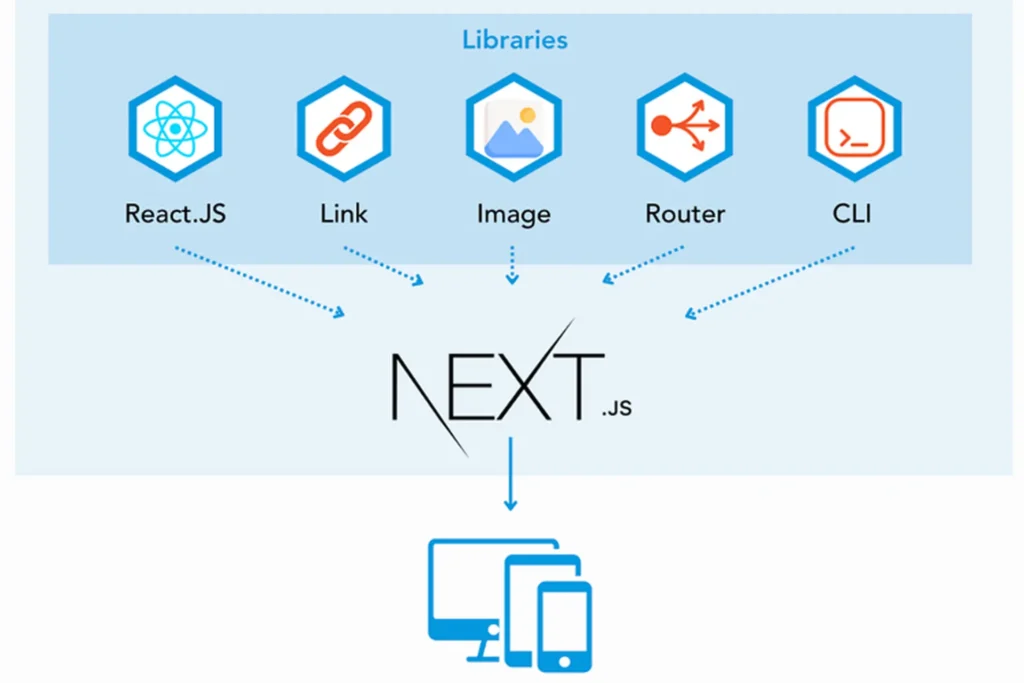
Next.js is an open-source React framework created by Vercel, first released in 2016. Unlike WordPress, Next.js is not a CMS — it’s a full-stack JavaScript framework that gives developers extraordinary control over how pages are built, rendered, and delivered.
Next.js supports multiple rendering strategies: Static Site Generation (SSG) pre-builds pages at deploy time for maximum speed; Server-Side Rendering (SSR) generates pages per request for dynamic content; and Incremental Static Regeneration (ISR) intelligently rebuilds only changed pages. This rendering flexibility is at the core of Next.js’s performance advantage.
Major brands including Netflix, Hulu, Airbnb, and Notion have adopted Next.js specifically because it enables engineering teams to build experiences that are simultaneously fast, dynamic, and scalable.
| Attribute | WordPress | Next.js |
| Launch Year | 2003 | 2016 |
| Technology Stack | PHP + MySQL | React + Node.js (JavaScript) |
| Primary Use Case | Content Management System (CMS) | React-based Web Framework |
| Rendering Method | Server-Side PHP (traditional) | SSG / SSR / ISR (flexible) |
| Learning Curve | Low — non-technical friendly | Moderate to High — developer-focused |
| Hosting Options | Shared, VPS, Managed WP | Vercel, AWS, Netlify, any Node host |
| Market Share | 43%+ of all websites | Rapidly growing, ~2M+ sites |
| Best For | Content blogs, simple business sites | High-performance apps & marketing sites |
2. Performance Deep Dive: Speed Benchmarks & Core Web Vitals
Website speed is no longer just about user experience — it’s a direct Google ranking factor. Since the Page Experience update, Google’s Core Web Vitals (LCP, FID/INP, CLS) form part of the ranking algorithm. Here’s how the two platforms stack up in the real world.
Core Web Vitals: The Metrics That Matter
Google measures three primary performance signals. Largest Contentful Paint (LCP) measures how quickly the main content loads — Google’s threshold is under 2.5 seconds for a ‘Good’ score. Cumulative Layout Shift (CLS) measures visual stability during loading, with a target below 0.1. Interaction to Next Paint (INP) measures responsiveness to user interactions, targeting under 200ms.
WordPress Performance Reality Check
A typical WordPress installation — even on a fast host — faces several structural performance challenges. Dynamic PHP rendering means every page visit triggers a database query by default. Plugin bloat is common, with the average WordPress site loading 20+ plugins that each add HTTP requests. Render-blocking resources such as CSS and JavaScript frequently delay page load. Without aggressive optimization, average WordPress LCP scores hover between 3.5 and 5+ seconds.
However, modern WordPress can achieve ‘Good’ Core Web Vitals scores through a combination of: premium managed hosting (WP Engine, Kinsta, Cloudways), a robust caching layer (WP Rocket, W3 Total Cache), a CDN (Cloudflare), and an optimized theme (GeneratePress, Kadence, Blocksy). With this stack, LCP can be pushed below 2.5s for moderately complex sites.
Next.js Performance: Structural Advantages
Next.js’s performance advantages are architectural, not merely configurational. Static generation (SSG) means HTML is pre-built at deployment — the server simply serves a file, with zero database queries. Automatic code splitting means users only download the JavaScript needed for the current page. Built-in image optimization via the Next.js Image component automatically converts images to WebP, applies lazy loading, and prevents layout shifts.
Real-world benchmarks consistently show Next.js SSG sites achieving LCP under 1.5 seconds, CLS near zero, and INP under 100ms. When deployed on Vercel’s Edge Network, content is served from the closest geographic node, reducing Time to First Byte (TTFB) to under 50ms for most users worldwide.
| Metric | WordPress (Optimized) | Next.js (SSG/ISR) | Google ‘Good’ Threshold |
| LCP (Largest Contentful Paint) | 2.5–3.5 seconds | 0.8–1.5 seconds | < 2.5 seconds |
| CLS (Cumulative Layout Shift) | 0.05–0.15 | 0.00–0.05 | < 0.1 |
| INP (Interaction to Next Paint) | 150–300ms | 50–100ms | < 200ms |
| TTFB (Time to First Byte) | 200–600ms | 20–80ms (Edge CDN) | < 800ms |
| Page Size (average) | 1.5–3.5 MB | 0.5–1.2 MB | Varies |
| HTTP Requests (average) | 60–120 | 15–40 | Minimize |
| PageSpeed Score (avg mobile) | 55–75 | 85–98 | 90+ = Good |
Note: WordPress scores represent a well-optimized installation with caching, CDN, and a lightweight theme. Unoptimized WordPress sites frequently score 20-40 on mobile PageSpeed. Next.js scores represent SSG deployment on a global CDN.
| iCreationsLAB Performance Case Study: We recently migrated a B2B SaaS company’s marketing site from WordPress to Next.js. Mobile PageSpeed scores improved from 48 to 94. Organic traffic grew 67% within 6 months post-migration. Bounce rate decreased by 23%. The performance improvement directly translated to measurable business outcomes. |
3. SEO Capabilities: Which Platform Ranks Better?
The relationship between your web platform and SEO performance is deeper than most business owners realize. Beyond meta tags and sitemaps, your platform’s architecture fundamentally influences how search engines crawl, index, and rank your content.
Technical SEO Foundations
Both platforms can implement all standard technical SEO elements: meta titles and descriptions, canonical URLs, Open Graph tags, robots.txt, XML sitemaps, and structured data (Schema.org). The question is not whether these elements are possible, but how easily and reliably they’re implemented.
WordPress handles basic SEO through plugins — primarily Yoast SEO or Rank Math, which are both powerful and well-maintained. For content teams without developer support, this plugin-based approach is genuinely excellent. However, WordPress’s reliance on plugins for SEO-critical features means your SEO infrastructure is only as reliable as those plugins’ compatibility with your theme and other plugins.
Next.js handles SEO metadata through code — either the App Router’s built-in Metadata API (Next.js 13+) or the widely-used next-seo library. This approach is more rigid (requires developer involvement for changes) but also more reliable and performant. Crucially, Next.js’s rendering model — particularly SSG and SSR — ensures that search engine crawlers always receive fully-rendered HTML, eliminating the indexability concerns historically associated with JavaScript-heavy frameworks.
Crawlability and Indexability
Google’s ability to crawl and index your content is paramount. WordPress’s server-rendered HTML is natively crawlable. However, themes with heavy JavaScript, lazy-loaded content, or dynamic elements can create crawl challenges.
Next.js SSG and SSR both produce server-rendered HTML that is immediately crawlable — no JavaScript execution required for Googlebot to see your content. This is a significant architectural advantage over pure React/SPA (Single Page Application) architectures, which require JavaScript rendering and can cause indexation delays.
Page Speed as a Ranking Factor
Google confirmed page speed as a ranking factor for mobile search in 2018, and this has only grown in importance with the Core Web Vitals update. Every second of improvement in LCP correlates with measurable improvements in search rankings, particularly in competitive niches.
Given that Next.js consistently achieves better Core Web Vitals scores than WordPress, it carries a structural SEO advantage in speed-sensitive rankings. Independent studies by Backlinko, Ahrefs, and SEMrush have found that top-ranking pages consistently achieve ‘Good’ Core Web Vitals scores — a threshold more easily met with Next.js than WordPress.
Content Management and SEO Workflows
This is where WordPress retains a genuine, significant advantage. WordPress’s native editor (Gutenberg/Block Editor) plus Yoast SEO provides a content workflow that is arguably unmatched in user-friendliness. Content editors can optimize meta tags, preview social sharing, check readability scores, and manage internal linking without any technical knowledge.
Next.js, being a developer framework, requires a headless CMS (Contentful, Sanity, Strapi, or similar) for content management. This adds architectural complexity and cost. Content editors must learn a new interface, and SEO metadata management requires custom implementation. The upside: a well-implemented Next.js + headless CMS stack gives you complete flexibility, but it demands more initial investment.
| SEO Factor | WordPress | Next.js |
| Meta Tags Management | Excellent (Yoast/RankMath plugins) | Excellent (Metadata API / next-seo) |
| Structured Data (Schema) | Good (plugin-based) | Excellent (code-level, reliable) |
| Page Speed (Core Web Vitals) | Moderate — requires optimization | Excellent — structural advantage |
| Crawlability | Excellent (native SSR HTML) | Excellent (SSG/SSR HTML) |
| XML Sitemaps | Automatic (Yoast plugin) | Custom implementation / next-sitemap |
| Content Editor SEO Tools | Outstanding (Yoast workflow) | Requires headless CMS setup |
| International SEO (i18n) | Plugin-dependent (WPML/Polylang) | Built-in Next.js i18n routing |
| URL Structure Control | Good (Permalink settings) | Complete (developer-defined) |
| Mobile Optimization | Theme-dependent | Full control, typically excellent |
See More: How to Check Website Speed: A Complete SEO Guide
4. Scalability: Can It Grow With Your Business?
Scalability is often the hidden deciding factor for growing businesses. A platform that works well at 10,000 monthly visitors may buckle under 500,000. Understanding the scalability profiles of each platform helps you avoid costly migrations at precisely the wrong moment — when your business is gaining momentum.
WordPress Scalability Considerations
WordPress can scale, but scaling requires deliberate architectural investment. At high traffic volumes, WordPress’s PHP-MySQL architecture requires: horizontal scaling (multiple web servers), database replication and optimization, aggressive object caching (Redis or Memcached), and a robust CDN for static assets. Enterprise-scale WordPress sites running on WP Engine’s dedicated infrastructure or Automattic’s VIP platform can handle millions of monthly visitors — but the cost and complexity escalate significantly.
For most small-to-mid-sized businesses receiving under 100,000 monthly visitors, a well-configured managed WordPress host provides adequate performance. Beyond that threshold, architecture reviews become necessary and costs increase substantially.
Next.js Scalability Advantages
Next.js’s static generation model scales almost infinitely at negligible cost. Pre-built HTML files served from a global CDN (like Vercel’s Edge Network) handle millions of requests without additional server infrastructure. Adding server capacity doesn’t require horizontal scaling of application servers — it’s handled automatically at the CDN layer.
For pages that require dynamic data, Next.js’s API routes and ISR allow fine-grained control: high-traffic static pages serve from CDN cache while dynamic sections fetch fresh data on demand. This hybrid architecture provides both performance and flexibility at scale — a combination WordPress can only approximate through complex caching configurations.
See More: Website Design Singapore: How to Build a Stunning Website That Converts
5. Security: Protecting Your Business Online
WordPress Security: The Plugin Problem
WordPress powers 43% of the web, making it the #1 target for hackers, malware, and automated bots. According to Sucuri’s annual Website Threat Research Report, WordPress accounts for over 94% of all infected CMS websites they analyze. The primary attack vectors are: outdated plugins (51% of infections), outdated themes (11%), and compromised credentials (16%).
This doesn’t mean WordPress is inherently insecure — it means security requires active maintenance. Regular core, theme, and plugin updates, combined with a Web Application Firewall (WAF), security scanning, and strong credentials, can maintain a robust security posture. Managed WordPress hosts like WP Engine and Kinsta include automated security scanning and malware removal.
Next.js Security: Reduced Attack Surface
Next.js’s security advantages come primarily from its reduced attack surface. Static sites (SSG) have no database, no server-side scripting runtime, and no admin interface exposed to the public web — the three most exploited WordPress attack vectors simply don’t exist. Without a publicly-accessible admin panel, brute-force admin attacks and SQL injections targeting the CMS are eliminated.
API routes in Next.js can still present security vulnerabilities if not properly implemented, and any third-party API integrations require security review. But the baseline security posture of a well-built Next.js site is stronger than an equivalent WordPress site, primarily due to architectural simplicity.
| Security Aspect | WordPress | Next.js |
| Attack Surface | Large (DB, PHP, admin panel, plugins) | Small (especially SSG sites) |
| Plugin Vulnerabilities | High risk — constant patching needed | Not applicable |
| SQL Injection Risk | Moderate (plugin-dependent) | Low (no DB in SSG) |
| Automated Maintenance | Required — critical for security | Minimal for static sites |
| Admin Panel Exposure | Public-facing /wp-admin | No public admin panel |
| Brute Force Risk | High (bots target wp-login.php) | Not applicable |
| Security Ecosystem | Excellent (Wordfence, Sucuri, etc.) | Platform-level (Vercel, Cloudflare) |
See More: Website Maintenance Checklist for Security
6. Cost Analysis: Total Cost of Ownership
Platform decisions are inevitably business decisions, and business decisions require financial clarity. The ‘cost’ of a web platform extends far beyond hosting fees — it encompasses developer time, maintenance overhead, plugin licenses, and opportunity costs from performance limitations.
WordPress Total Cost of Ownership
WordPress itself is free, but a production-ready WordPress business site involves: managed WordPress hosting ranging from $30 to $300+ per month depending on traffic, premium theme investment of $50 to $200 (one-time), essential premium plugins for SEO, security, caching, and forms at $200 to $600 per year, and developer time for setup, customization, and ongoing maintenance. A professionally managed WordPress site for a small-to-mid business typically costs $3,000 to $15,000 for initial development and $3,000 to $8,000 per year for ongoing maintenance.
Next.js Total Cost of Ownership
Next.js hosting on Vercel starts free for personal projects, with Pro plans at $20/month and Enterprise pricing for large-scale needs. The primary cost driver for Next.js is developer time: building a Next.js site requires skilled JavaScript/React developers who typically command higher hourly rates than WordPress developers. A Next.js site with a headless CMS typically requires $8,000 to $40,000 for initial development. However, ongoing maintenance costs are often lower due to reduced plugin management overhead and superior platform reliability.
| Total Cost Reality Check: For a basic business website or blog, WordPress often has a lower initial investment and broader access to non-technical talent. For a high-traffic e-commerce site, SaaS marketing site, or performance-critical application, Next.js’s superior performance frequently delivers higher ROI despite higher initial development costs — through improved conversion rates, better SEO rankings, and lower hosting costs at scale. |
See More: Website Design Cost in Singapore: Complete Pricing Guide
7. Developer Experience & Ecosystem
WordPress Ecosystem
The WordPress ecosystem is the largest in web development. With over 60,000 plugins in the official repository and thousands more commercial options, almost any functionality can be added without custom development. This breadth makes WordPress extraordinarily powerful for non-developers and small businesses without dedicated engineering teams.
The talent pool is vast: WordPress developers are available globally at every price point. For businesses that rely on freelancers or small agencies, finding WordPress expertise is straightforward. The community — forums, documentation, YouTube tutorials, and local meetups (WordCamps) — provides exceptional support resources.
Next.js Developer Experience
Next.js has become one of the most beloved frameworks in the JavaScript ecosystem. Its developer experience features — Fast Refresh (instant code changes without losing state), TypeScript support out of the box, built-in CSS Modules and Tailwind CSS integration, and comprehensive documentation — make it genuinely enjoyable to work with for experienced JavaScript developers.
The Next.js ecosystem leverages the entire npm registry (2+ million packages) and the React community (the most popular frontend library in the world). However, finding Next.js specialists commands a premium, and the framework’s power requires JavaScript expertise to wield effectively.
8. Which Platform Should Your Business Choose?
After this comprehensive analysis, the answer to ‘WordPress vs Next.js’ is nuanced: both are legitimate, powerful choices — but they serve different business profiles optimally.
Choose WordPress If…
- Your team includes non-technical content editors who need to publish independently without developer involvement
- You’re building a content-driven blog, news site, or small business brochure site with under 50,000 monthly visitors
- Your budget for initial development is under $5,000 and you need to launch quickly
- You need specific functionality available as WordPress plugins (e.g., WooCommerce for e-commerce, Amelia for bookings)
- Your team is comfortable managing hosting, updates, and security maintenance regularly
- You don’t have in-house JavaScript/React development capability
Choose Next.js If…
- Performance and Core Web Vitals scores are a priority for competitive SEO rankings
- You’re building a high-traffic site (100,000+ monthly visitors) where speed directly impacts conversions
- Your product is a web application with complex, dynamic functionality
- You have access to JavaScript/React development resources (in-house or agency)
- You need a headless architecture that separates frontend presentation from backend data sources
- Long-term scalability, security, and maintainability are primary concerns
- You’re building a SaaS product, marketplace, or e-commerce platform where performance is competitive differentiator
The Hybrid Approach: Headless WordPress + Next.js
Increasingly, sophisticated businesses are combining the strengths of both platforms: WordPress serves as the headless CMS backend (providing the familiar editorial interface content teams love), while Next.js consumes WordPress’s REST API or GraphQL layer (via WPGraphQL) to render blazing-fast, SEO-optimized pages.
This headless architecture delivers the best of both worlds — WordPress’s content management excellence with Next.js’s performance superiority. It’s the approach iCreationsLAB recommends for growing businesses that have existing WordPress content investments but need performance improvements.
| Business Scenario | Recommended Platform |
| Small business brochure site, limited budget | WordPress (managed hosting) |
| Content blog, 1-3 editors, regular publishing | WordPress (Gutenberg + Yoast) |
| E-commerce, simple product catalog | WordPress + WooCommerce |
| High-traffic e-commerce, performance-critical | Next.js + headless commerce |
| SaaS marketing site, SEO-driven growth | Next.js (SSG + ISR) |
| B2B lead gen site, high competition | Next.js (performance SEO advantage) |
| News/media site with frequent publishing | Headless WordPress + Next.js |
| Enterprise web application | Next.js (full-stack capability) |
| Non-profit with limited tech resources | WordPress (broad support ecosystem) |
9. About iCreationsLAB: Your Platform Decision Partner
At iCreationsLAB, we’ve spent years building high-performance websites and web applications for businesses across industries — from startups to enterprise brands. Our team includes certified WordPress developers, senior Next.js engineers, and SEO strategists who understand that the best technical decision is always the one aligned with your specific business goals.
We don’t advocate for one platform over another — we advocate for the right solution for each client. Our discovery process begins with a thorough audit of your current performance baseline, growth trajectory, team capabilities, and competitive landscape. From there, we architect and build solutions engineered to outperform.
Our Web Development Services Include:
- Custom Next.js Development: High-performance marketing sites, web applications, and e-commerce platforms built with modern React architecture
- WordPress Development: Professional CMS implementations with optimized themes, custom plugins, and performance-tuned hosting configurations
- Headless Architecture: Combining WordPress CMS with Next.js frontend for maximum editorial flexibility and technical performance
- Core Web Vitals Audits: Comprehensive performance analysis and optimization for existing sites on any platform
- SEO Technical Audits: In-depth crawlability, indexation, and on-page SEO analysis with actionable remediation roadmaps
- Platform Migration: Seamless, SEO-preserving migrations from WordPress to Next.js or vice versa
10. Conclusion: Performance and SEO in 2026 and Beyond
The WordPress vs Next.js debate ultimately reflects a broader evolution in web technology. WordPress, with its two-decade heritage and unmatched accessibility, remains a powerful, legitimate choice for content-focused businesses. For the right use case, it’s still the most efficient path to a professional online presence.
Next.js represents where web performance is headed — a future where every millisecond of loading time is optimized at the architectural level, where SEO performance is built into the rendering model rather than bolted on through plugins, and where development workflows are designed for the scale and complexity of modern digital businesses.
For businesses where organic search is a primary growth channel, where conversions are sensitive to page load time, or where scale demands infrastructure efficiency, Next.js provides a compelling, measurable advantage. For businesses where content agility, budget efficiency, and team accessibility are paramount, WordPress continues to deliver exceptional value.
The wisest approach in 2026 is not to ask ‘which platform is better,’ but to ask ‘which platform is better for my specific business, team, and goals’ — and to partner with experienced web professionals who can guide that decision with data, not dogma.
| Ready to Build Your Dream Website? Whether you need a blazing-fast Next.js application or a powerful WordPress site, iCreationsLAB delivers world-class web solutions tailored to your business goals. iCreationsLAB — Your Trusted Web Development Partner Get a FREE consultation today! |