

Your website may be getting traffic, but low conversions often come from poor user experience (UX), not bad visitors. Many Singapore businesses face this gap between having a website and having one that actually drives results.
A UX audit helps identify where users drop off and what’s causing friction, so you can fix issues and improve conversions. In Singapore’s competitive digital market, delivering a smooth, fast, and trustworthy experience is essential.
This guide provides a practical framework to understand UX audits, uncover common conversion issues, and prioritise improvements to turn your website into a high-performing business tool.
| 88% of users won’t return after a bad UX | 73% of SG purchases happen on mobile | 200% avg. CRO uplift from UX fixes | 7% conversion drop per 1s page delay |
1. What Is a UX Audit and Why Does Your Singapore Website Need One?
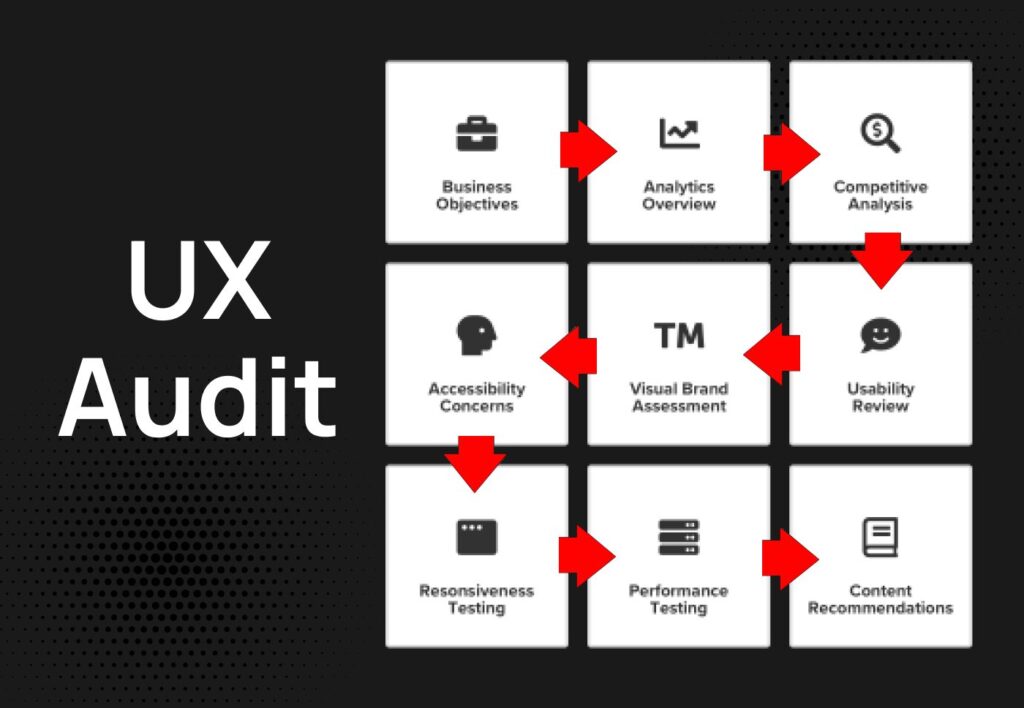
A UX audit (sometimes called a usability audit or conversion audit) is a structured evaluation of your website’s user experience — identifying friction points, usability failures, accessibility issues, and conversion barriers that prevent visitors from taking the action you want them to take.
Unlike a general website review, a UX audit is evidence-based and methodical. It combines qualitative research (expert heuristic evaluation, user interviews, usability testing) with quantitative data (analytics, heat maps, session recordings) to build a complete picture of where your website is failing its users.
Why Singapore Businesses Specifically Need UX Audits
Singapore’s digital consumers are among the most demanding in Southeast Asia. They are mobile-first, impatient with slow load times, highly price-sensitive, and expect enterprise-grade design from even small businesses. Studies by Google and Temasek consistently show that Singapore’s eCommerce abandonment rates are driven primarily by poor mobile UX, slow checkout processes, and lack of trust signals — all addressable through a focused UX audit.
Moreover, Singapore’s multilingual, multicultural consumer base means UX considerations extend beyond standard Western frameworks. Navigation patterns, content hierarchy, and trust cues can differ across Chinese-speaking, Malay-speaking, and English-speaking user segments — nuances that only a Singapore-specific UX audit will capture.
| 💡 When Should You Conduct a UX Audit? → Your bounce rate exceeds 60% on key landing pages → Your conversion rate is below 2% (eCommerce) or 5% (lead generation) → You are preparing a website redesign or major update → You have launched a new product or campaign with disappointing results → Your mobile traffic converts significantly worse than desktop → You are experiencing high cart abandonment (above 70% for Singapore eCommerce) → You are scaling ad spend but not seeing proportional revenue growth |
See More: Custom UI UX Design Solutions for Businesses
2. The Most Common Conversion Killers on Singapore Websites
Before walking through the audit methodology, it helps to know what you are likely to find. Based on iCreationsLAB’s audits of Singapore business websites across retail, F&B, B2B services, healthcare, and professional services, these are the ten most common UX failures we encounter.
Killer #1: Catastrophic Mobile Experience
With 73% of Singapore online shoppers purchasing on mobile, a website that was designed primarily for desktop is a conversion disaster. Common mobile UX failures we find include: buttons that are too small to tap comfortably, text that requires horizontal scrolling, forms with poorly sized input fields, and checkout processes that collapse on mobile viewports. A poor mobile experience alone can account for 40–60% of lost conversions on Singapore eCommerce sites.
Killer #2: Slow Page Load Speed
Singapore consumers expect near-instant page loads. Google’s research shows that 53% of mobile users abandon a site that takes more than 3 seconds to load. Yet the average Singapore SME website loads in 4.8 seconds on a 4G connection — nearly twice the acceptable threshold. Every additional second of load time costs you conversions, and it also costs you Google rankings through Core Web Vitals scoring.
Killer #3: Weak or Absent Trust Signals
Singapore consumers are increasingly savvy about online security and brand credibility. Websites that lack visible trust signals — SSL indicators, recognisable payment logos, customer reviews, business registration numbers, Singapore-specific contact details, and social proof — see dramatically lower conversion rates. This is especially critical for newer brands or businesses in regulated industries like finance, healthcare, and legal services.
Killer #4: Confusing Navigation and Information Architecture
If users cannot find what they are looking for within two to three clicks, they leave. Poorly structured navigation — too many top-level items, inconsistent labelling, buried product categories, no clear search function — is one of the most common UX failures in Singapore business websites, particularly those that have grown organically without a deliberate information architecture review.
Killer #5: Friction-Heavy Checkout or Contact Process
For eCommerce, every additional field, screen, or decision point in the checkout process reduces conversion probability. Singapore consumers expect guest checkout, multiple payment options (including PayNow and GrabPay), and a mobile-optimised payment flow. For service businesses, contact forms with excessive required fields, no live chat option, or no real-time booking capability introduce unnecessary friction.
Killer #6: Unclear Value Proposition Above the Fold
Visitors decide within 5 seconds whether to stay on your website or leave. If your homepage hero section does not immediately and clearly communicate what you offer, who it is for, and why you are the best choice, you have lost them. Vague taglines, generic stock photography, and buried calls-to-action are hallmarks of a homepage that fails its conversion job.
Killer #7: Poor Readability and Content Structure
Walls of text, tiny font sizes, insufficient contrast, and lack of visual hierarchy make content exhausting to consume — particularly on mobile. Singapore’s web users are scanning, not reading. Content that is not formatted for scanning (short paragraphs, subheadings, bullet points, bold key phrases) will not hold attention long enough to convert.
Killer #8: Misaligned Call-to-Action Strategy
Either there are too many competing calls-to-action on a single page (causing decision paralysis) or the right CTAs are missing entirely from high-traffic pages. A UX audit reveals exactly where users’ attention goes and whether your CTAs are positioned, designed, and worded to capture that attention at the moment of highest intent.
Killer #9: Broken User Flows and Technical Errors
Broken links, 404 pages in critical conversion paths, forms that fail silently, and session errors during checkout are silent revenue killers that often go undetected for months — particularly on websites managed without regular technical monitoring. In our Singapore web audits, we find at least one critical user-flow error in approximately 60% of sites reviewed.
Killer #10: No Post-Purchase or Post-Enquiry Experience
Many Singapore businesses invest heavily in acquisition but neglect what happens after the first conversion. Poor order confirmation pages, missing transactional emails, no follow-up sequences, and absence of upsell or cross-sell opportunities leave significant revenue on the table — and damage the customer relationship that drives lifetime value.
See More: UX or SEO? Why a Professional Website Designer Needs Both
3. UX Audit Impact: Before and After — Real Singapore Context
The following table illustrates the typical before-and-after outcomes from addressing the most common UX failures identified in Singapore website audits.
| Issue Area | ❌ Before UX Audit | ✅ After UX Fix |
| Mobile Checkout | Multi-step, desktop-designed checkout collapsing on iPhone — 81% mobile cart abandonment | Mobile-first one-page checkout with PayNow QR — mobile abandonment drops to 47% |
| Page Speed | Homepage loads in 5.2s on 4G — bounce rate 72% | Optimised with CDN + WebP images — 1.8s load, bounce rate drops to 41% |
| Trust Signals | No reviews, no SSL badge, no ABN/UEN, generic contact page | Added 47 Google reviews, trust badges, UEN, WhatsApp CTA — conversions +38% |
| Navigation | 12 top-level nav items, no mega-menu, search function hidden | Simplified to 6 nav items, sticky header, prominent search — pages/session +61% |
| CTA Strategy | 3 competing CTAs on homepage hero, no urgency, generic ‘Learn More’ | Single focused CTA per section, A/B tested copy — click-through rate +54% |
| Value Proposition | Generic tagline ‘Quality Service, Every Time’ with no specifics | Specific USP ‘Delivered in 2 Hours Across Singapore’ — enquiries +29% |
| Form Friction | 8-field contact form, no phone option, no auto-fill | 3-field form + WhatsApp button + Calendly booking — leads +87% |
4. How to Conduct a UX Audit: The Complete Singapore Framework
A professional UX audit follows a structured methodology that combines multiple research techniques to triangulate a complete picture of user experience failures. Here is the framework iCreationsLAB uses when auditing Singapore business websites.
| Phase | Stage | Activities | Tools | Outcome |
| 01 | Data Baseline | GA4 setup, funnel mapping, bounce/exit rate analysis, conversion goal verification | Google Analytics 4, Search Console, Looker Studio | Traffic & conversion baseline |
| 02 | Heuristic Evaluation | Expert review against Nielsen’s 10 usability heuristics, WCAG accessibility check, mobile review | Manual review + Lighthouse + WAVE | Expert issue catalogue |
| 03 | Quantitative Research | Heat map analysis, scroll maps, click maps, session recording review, A/B test data | Hotjar / Microsoft Clarity, VWO | Behavioural evidence map |
| 04 | Technical Audit | Core Web Vitals, broken link scan, 404 check, form testing, mobile rendering review | PageSpeed Insights, Screaming Frog, GTmetrix | Technical bug list |
| 05 | User Research | 5-user moderated usability sessions, SG-relevant task scenarios, exit survey analysis | Maze, Lookback, Typeform | Qualitative insight report |
| 06 | Synthesis & Prioritisation | Issue severity scoring (impact × effort), quick-win identification, roadmap creation | RICE framework, impact/effort matrix | Prioritised fix roadmap |
| 07 | Implementation & Testing | Fix deployment, A/B testing, regression check, 30-day conversion monitoring | WordPress / WooCommerce, Optimizely, GA4 | Validated conversion uplift |
5. Phase 1: Establishing Your Analytics Baseline
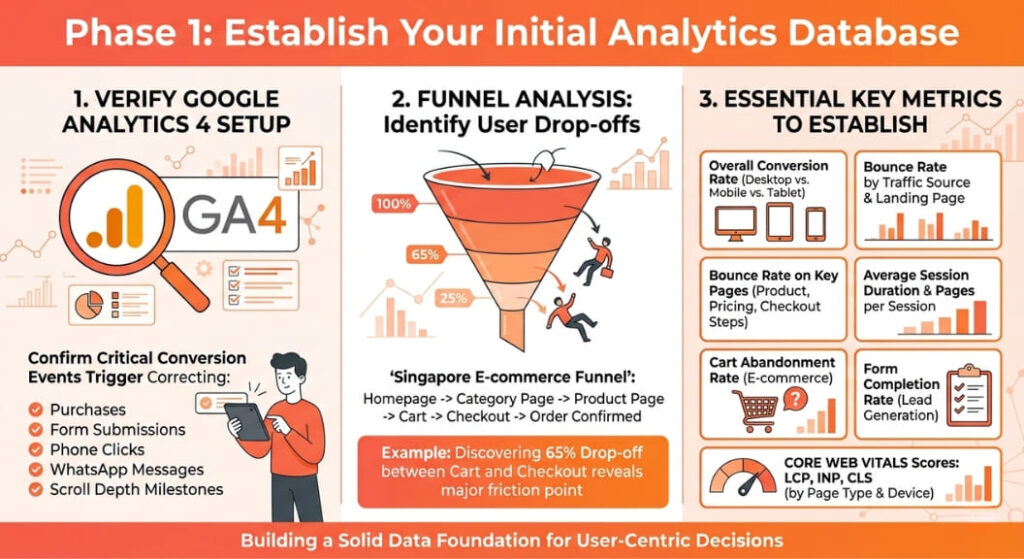
No UX audit is credible without solid data as its foundation. Before you evaluate a single page, you need to be confident that your analytics setup is capturing accurate user behaviour.
5.1 Google Analytics 4 Setup Verification
GA4 is the standard for Singapore businesses in 2026, but its setup is frequently misconfigured. Begin your audit by verifying that all key conversion events are firing correctly — purchases, form submissions, phone clicks, WhatsApp initiations, and scroll depth milestones. Missing event tracking means you are making UX decisions with incomplete data.
5.2 Funnel Analysis: Where Are Users Dropping Off?
GA4’s funnel exploration tool allows you to map the exact user journey from landing page to conversion and identify at which step the majority of drop-offs occur. For a Singapore eCommerce site, a typical funnel might be: Homepage → Category Page → Product Page → Cart → Checkout → Order Confirmation. Finding that 65% of users drop off between Cart and Checkout immediately focuses your audit on that specific experience.
5.3 Key Metrics to Establish
- Overall conversion rate by device (desktop vs. mobile vs. tablet)
- Bounce rate by traffic source and landing page
- Exit rate on key pages — product pages, pricing pages, checkout steps
- Average session duration and pages per session
- Cart abandonment rate (for eCommerce)
- Form completion rate (for lead generation)
- Core Web Vitals scores — LCP, INP, CLS — by page and device type
See More: E-Commerce Website Design: Boost Sales with Stunning UX and Effective Strategies
6. Phase 2: Heuristic Evaluation — The Expert Eye
A heuristic evaluation is a structured expert review of your website against established usability principles. The most widely used framework is Nielsen Norman Group’s 10 Usability Heuristics, which have proven applicable across virtually every digital interface context — including Singapore eCommerce and service sites.
| ✅ Nielsen’s 10 Heuristics: Singapore UX Audit Checklist |
| ☑ Visibility of system status — Do users always know what is happening? (loading states, form feedback, order confirmation) |
| ☑ Match between system and real world — Does the language and logic match how Singapore users think? (local idioms, familiar payment names like PayNow) |
| ☑ User control and freedom — Can users easily undo, go back, or exit processes? (navigation breadcrumbs, edit cart, cancel booking) |
| ☑ Consistency and standards — Are UI patterns consistent across pages? (button styles, icon meaning, navigation labels) |
| ☑ Error prevention — Are form fields validated in real time? Are confusing choices eliminated before users make mistakes? |
| ☑ Recognition over recall — Are choices visible, not requiring users to remember past interactions? (persistent cart, recently viewed) |
| ☑ Flexibility and efficiency — Can experienced users shortcut? (saved addresses, quick buy, one-click reorder) |
| ☑ Aesthetic and minimalist design — Is every page element earning its place? (remove distracting banners, competing CTAs) |
| ☑ Help users recognise, diagnose, and recover from errors — Are error messages clear, specific, and actionable in plain language? |
| ☑ Help and documentation — Is contextual help available without disrupting the user flow? (FAQ accordions, live chat, tooltips) |
7. Phase 3: Quantitative Behaviour Research
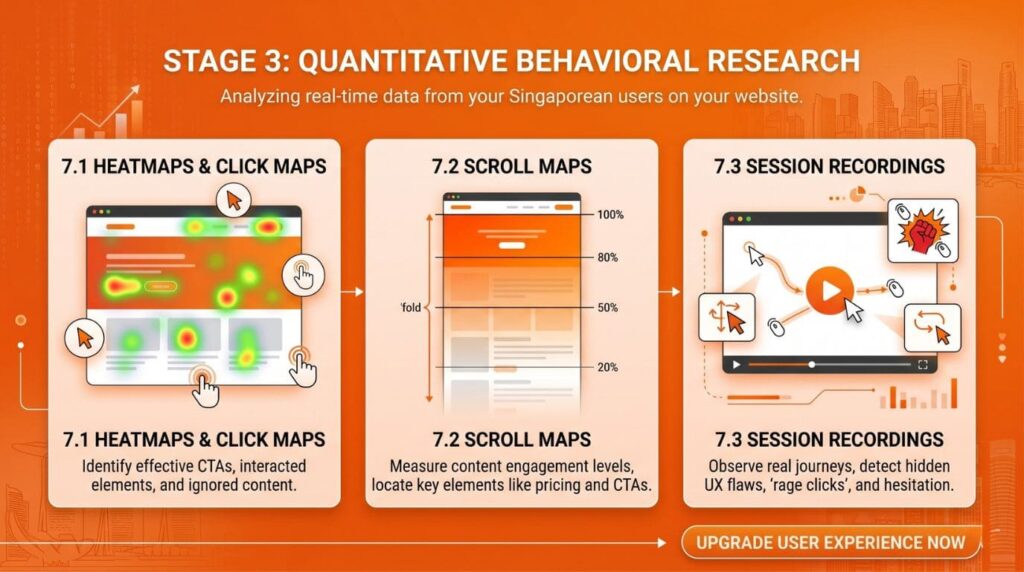
Where heuristic evaluation reveals what might be a problem based on established principles, quantitative behaviour research shows you what is actually happening with your real Singapore users. This phase uses three primary tools.
7.1 Heat Maps and Click Maps
Heat mapping tools like Hotjar or Microsoft Clarity (free and excellent for Singapore SMEs) overlay colour-coded maps on your website showing where users click, tap, and hover. This reveals whether your CTAs are being seen, whether users are clicking on non-clickable elements (a sign of unclear affordance), and whether important content is being ignored because it sits below the scroll threshold.
7.2 Scroll Maps
Scroll maps show how far down each page the average Singapore user scrolls before stopping. If 80% of users never see your pricing section, product reviews, or contact CTA because they are positioned too far down the page, this is a structural content issue that a scroll map will immediately expose. Critically important for long-form product pages and Singapore landing pages designed for paid traffic.
7.3 Session Recordings
Session recordings are video replays of real user journeys on your website. Watching ten to fifteen recordings of users who abandoned your checkout, did not complete a contact form, or left a product page without adding to cart reveals UX failures that no amount of analytics data would expose. Look for rage clicks (repeated frustrated tapping), erratic cursor movements, and hesitation before form fields — all diagnostic signals of UX friction.
See More: Top 5 Web Design Companies in Singapore
8. Phase 4: Technical Performance Audit
Even a beautifully designed website with perfect information architecture will fail to convert if it is technically broken or painfully slow. The technical performance audit ensures the mechanical foundation of your Singapore website is solid.
8.1 Core Web Vitals Assessment
| ⚡ Core Web Vitals: Singapore Target Benchmarks (2026) LCP (Largest Contentful Paint) — Target: under 2.5 seconds | Poor: above 4.0 seconds INP (Interaction to Next Paint) — Target: under 200ms | Poor: above 500ms CLS (Cumulative Layout Shift) — Target: under 0.1 | Poor: above 0.25 Use Google PageSpeed Insights, Lighthouse, or Web Vitals Chrome extension to measure. Singapore-hosted sites benefit from ap-southeast-1 (Singapore) CDN edge nodes for lowest latency. |
8.2 Broken Link and 404 Audit
Use Screaming Frog, Ahrefs, or Google Search Console’s Coverage report to identify broken internal links, dead product pages, and 404 errors sitting in your critical conversion paths. These are silent revenue killers — a user who clicks through to a product that returns a 404 will almost certainly not convert, even if they return to the site.
8.3 Form and Checkout Technical Testing
Test every form and checkout step across multiple devices and browsers. Common technical failures include: form submissions that succeed visually but fail to send the data server-side, PayNow QR codes that do not regenerate on timeout, address autocomplete that does not work with Singapore postal codes, and session timeout errors that wipe cart contents during checkout.
9. Phase 5: User Testing with Singapore Participants
Quantitative data tells you what is happening. User testing tells you why. A moderated usability test with five to eight Singapore-based participants — representative of your actual target audience — will surface the qualitative insight that explains the patterns you saw in your analytics data.
9.1 Task Scenario Design for Singapore Context
Design task scenarios that reflect real Singapore user intent. For an F&B delivery site, a task might be: ‘You want to order lunch for delivery to your office in Raffles Place — find something suitable and complete the order.’ For a B2B services site: ‘You are a procurement manager looking for a cleaning services contract for your Jurong manufacturing facility — find the relevant information and make an enquiry.’
9.2 Think-Aloud Protocol
Ask participants to narrate their thoughts while completing tasks. This real-time commentary reveals the mental models users bring to your site — often very different from the assumptions your team made when designing it. Moments of hesitation, confusion, or surprise are the most diagnostically valuable findings from this exercise.
9.3 Remote vs. In-Person Testing in Singapore
Both moderated remote testing (via Zoom with screen share) and in-person testing are viable in Singapore. Remote testing allows you to recruit participants from across Singapore without geographic constraint and is generally more affordable. In-person testing provides richer observation of body language and emotional response. For most Singapore SME budgets, five remote sessions via a tool like Maze or Lookback provide sufficient qualitative insight for an initial UX audit.
See More: WordPress Security Singapore: 12 Steps to Protect Your Business Website
10. Phase 6: Prioritising and Fixing UX Issues — The Impact-Effort Matrix
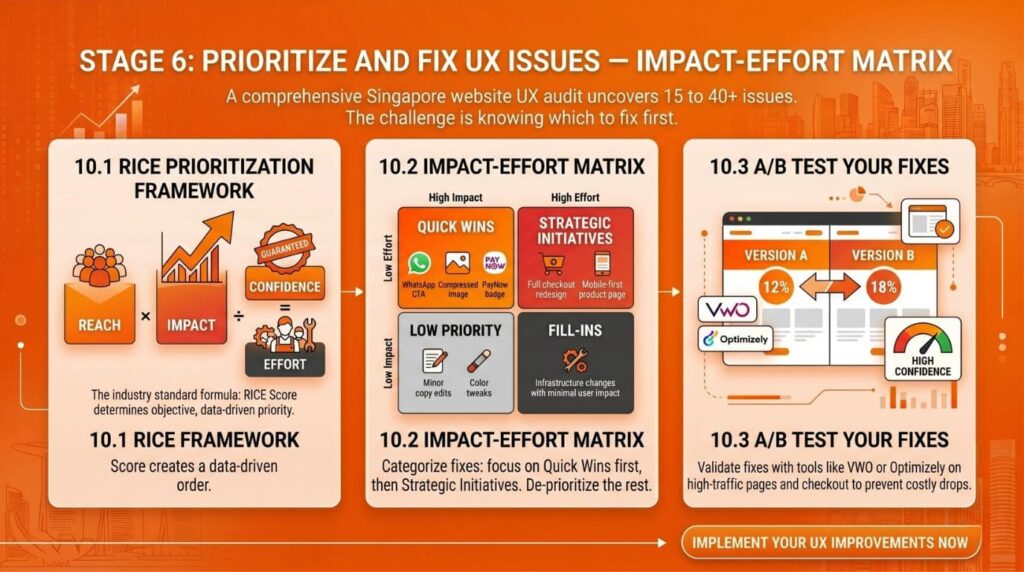
A thorough UX audit of a Singapore website typically surfaces fifteen to forty distinct issues. The challenge is not finding problems — it is knowing which ones to fix first. Not all UX issues have equal impact on conversions, and not all fixes require equal effort.
10.1 The RICE Prioritisation Framework
RICE scoring — Reach × Impact × Confidence ÷ Effort — is the industry-standard framework for prioritising UX fixes. Each identified issue is scored on how many users it affects (Reach), how significant the conversion impact is (Impact), how certain you are of that impact (Confidence), and how much development effort the fix requires (Effort). The resulting RICE score creates an objective, data-driven prioritisation order.
10.2 Quick Wins vs. Strategic Fixes
- Fix broken forms, add WhatsApp CTA, compress hero image, add PayNow badge, fix mobile tap target sizes Quick Wins (High Impact, Low Effort):
- Checkout redesign, navigation restructure, mobile-first product page rebuild, full checkout flow optimisation Strategic Fixes (High Impact, High Effort):
- Micro-copy tweaks, colour refinements, minor content updates Low Priority (Low Impact, Low Effort):
- Major infrastructure changes with minimal user-facing impact Deprioritise (Low Impact, High Effort):
10.3 A/B Testing Your Fixes
Wherever possible, validate your UX fixes through A/B testing before full implementation — particularly for high-traffic pages and checkout flows. Tools like Google Optimize (or its successors), VWO, and Optimizely allow you to serve different versions of a page to different Singapore user segments and measure conversion rate differences with statistical confidence. This prevents costly mistakes where a seemingly logical UX change actually reduces conversions.
| 🔍 Is Your Website Losing Conversions Without You Knowing? iCreationsLAB offers professional UX Audit & Web Design Singapore services that identify exactly what is broken on your site — and fix it. We have helped Singapore businesses across retail, F&B, finance, and B2B turn underperforming websites into conversion-optimised revenue engines. ✅ Full UX Audit ✅ Conversion Rate Optimisation ✅ Custom Web Design Singapore ✅ Mobile-First Development ✅ SEO-Optimised from Launch ✅ Singapore Market Expertise 🌐 www.icreationslab.com | 📧 [email protected] | 📞 Get Your Free UX Consultation Today |
See More: Local SEO Singapore: How to Rank Your Business on Google Maps in 2026
11. Singapore-Specific UX Considerations Your Audit Must Cover
A UX audit conducted without Singapore market context will miss nuances that directly impact conversion rates for local businesses. Here are the Singapore-specific UX factors that require dedicated attention in any local audit.
11.1 Multilingual Content and Switching
Singapore’s population is predominantly English-speaking but with significant Mandarin-speaking, Malay-speaking, and Tamil-speaking segments. Businesses targeting a broad Singapore audience should audit their multilingual experience — including whether language switching is intuitive, whether translated content is properly localised (not just machine-translated), and whether font sizes accommodate CJK characters correctly.
11.2 Local Payment Method Visibility
Singapore consumers expect to see PayNow, GrabPay, and NETS payment options prominently displayed on product pages, checkout pages, and in site footers. The mere visibility of these familiar payment logos has been shown to increase purchase intent in Singapore user research. Audit whether your payment options are sufficiently visible, and whether your checkout process makes local payment methods first-class citizens rather than afterthoughts.
11.3 WhatsApp as a Conversion Channel
WhatsApp is the dominant messaging platform in Singapore, and for many Singapore consumers — particularly in the 35+ age bracket — WhatsApp is the preferred channel for pre-purchase enquiries. A ‘Chat on WhatsApp’ CTA on product pages, pricing pages, and the contact page can dramatically increase enquiry rates, particularly for high-consideration purchases. Audit whether your website has WhatsApp integration and whether it is prominently positioned.
11.4 Delivery and Logistics Clarity
For eCommerce, Singapore consumers expect specific, transparent information about delivery times and costs — including same-day delivery options where applicable. Vague shipping information (‘3–5 business days’) is a conversion killer for Singapore shoppers accustomed to Lazada’s two-hour delivery and RedMart’s same-day slots. Audit your delivery messaging and ensure it is specific, prominent, and available before the checkout page.
11.5 GST and Pricing Transparency
Singapore’s GST rate is 9% as of 2024. Displaying prices exclusive of GST without clear notification creates unpleasant surprises at checkout — a proven conversion killer. Audit whether your product pages, pricing pages, and checkout process handle GST display transparently and consistently. The ACRA and IRAS guidelines recommend that prices displayed to Singapore consumers should include GST for B2C transactions.
12. How iCreationsLAB Conducts UX Audits for Singapore Businesses
At iCreationsLAB, our UX audit process has been refined over years of working with Singapore businesses across retail, F&B, professional services, B2B, and healthcare. We do not deliver 50-page reports that gather dust — we deliver actionable, prioritised roadmaps that our web design Singapore team can implement immediately.
Our UX Audit Deliverables
- Full Heuristic Evaluation Report covering all key pages and user flows
- Analytics Deep-Dive — GA4 funnel analysis, device breakdown, conversion path review
- Heat Map and Session Recording Analysis with annotated findings
- Core Web Vitals and Technical Performance Report with specific fix recommendations
- User Testing Summary — key insights from Singapore user sessions
- Prioritised Issue Registry — every issue scored by RICE framework
- 30-Day Quick Win Implementation Plan — fixes your team or ours can execute immediately
- Strategic UX Roadmap — medium and long-term improvements aligned to your business goals
From Audit to Implementation
Unlike audit-only agencies that hand you a report and disappear, iCreationsLAB’s web design Singapore team can take your audit findings directly into implementation. Whether that means redesigning your checkout flow, rebuilding your product pages for mobile, integrating PayNow and WhatsApp, or conducting a full WooCommerce or custom site rebuild, we execute the fixes with the same rigour we brought to identifying them.
See More: Next.js vs WordPress for Businesses: Which Is Faster & More SEO-Friendly?
13. Measuring UX Audit Success: Metrics That Matter
A UX audit’s value is only realised when you measure the impact of the changes it drives. Here are the metrics Singapore businesses should track in the 30–90 days following UX improvements.
Primary Conversion Metrics
- Conversion rate — overall and by device, traffic source, and landing page
- Revenue per visitor — total revenue divided by total sessions (eCommerce)
- Lead volume and quality — form submissions, WhatsApp initiations, phone calls
- Cart abandonment rate — percentage of sessions that reach cart but not purchase
- Checkout completion rate — percentage of sessions that initiate checkout and complete it
Secondary UX Health Metrics
- Bounce rate by page and traffic source — should fall as UX improves
- Pages per session — should increase as navigation clarity improves
- Session duration — should increase on key conversion pages
- Core Web Vitals scores — LCP, INP, CLS — should improve measurably after technical fixes
- Net Promoter Score (NPS) — track customer satisfaction alongside digital experience
| 📈 Expected Outcomes from a Professional UX Audit (Singapore SME Benchmarks) Conversion rate uplift: 15–60% improvement within 90 days of implementing priority fixes Bounce rate reduction: 10–25 percentage point reduction on key landing pages Mobile conversion parity: Mobile CVR improves to within 70–85% of desktop CVR Cart abandonment reduction: 8–20 percentage point reduction in abandonment rate Page speed improvement: 50–70% reduction in LCP for optimised pages Note: Outcomes vary by implementation quality, traffic volume, and starting UX baseline. Source: iCreationsLAB Singapore client data, aggregated 2024–2026. |
14. Frequently Asked Questions: UX Audit Singapore
How much does a UX audit cost in Singapore?
Professional UX audits in Singapore range from SGD 1,500–2,500 for a focused quick audit of a small website to SGD 5,000–15,000 for a comprehensive audit including user testing, analytics deep-dive, and full implementation roadmap for a complex eCommerce or enterprise site. Some web design agencies, including iCreationsLAB, offer UX audits as a precursor to a full web design Singapore project, in which case the audit cost may be credited against the project fee.
How long does a UX audit take?
A standard UX audit for a Singapore SME website (10–50 pages) typically takes two to four weeks from briefing to final report delivery. This includes analytics setup verification, heuristic evaluation, quantitative research, user testing recruitment and sessions, and synthesis. Rapid audits focusing only on quick wins can be delivered in five to seven business days.
Can I do a UX audit myself?
Parts of a UX audit are accessible to non-specialists — particularly analytics review, heat map analysis using free tools like Microsoft Clarity, and basic usability testing with colleagues or friends. However, a professional UX audit requires expert heuristic evaluation, proper user research methodology, and objective analysis that is difficult to achieve when you are too close to your own website. Most Singapore businesses benefit significantly from an independent expert perspective.
What is the difference between a UX audit and an SEO audit?
A UX audit focuses on how users experience and interact with your website — identifying friction that prevents conversions. An SEO audit focuses on how search engines crawl, index, and rank your website. These are complementary disciplines: an SEO audit gets users to your site, while a UX audit converts them once they arrive. Many Singapore businesses benefit from conducting both simultaneously, as many technical fixes (page speed, mobile responsiveness, Core Web Vitals) positively impact both UX and SEO.
How often should Singapore businesses conduct UX audits?
For actively growing Singapore businesses, a full UX audit is recommended annually or whenever a major product launch, site update, or sustained period of declining conversion rate occurs. Lighter monthly reviews of key metrics — conversion rates, bounce rates, Core Web Vitals — provide early warning signals that indicate when a deeper audit is warranted. Businesses running significant paid advertising budgets should audit more frequently, as every percentage point of conversion rate improvement directly multiplies paid traffic ROI.
See More: Dark Mode Web Design: A Complete 2026 Guide
Conclusion: Stop Losing Conversions — Start With a UX Audit
Your website is your highest-leverage sales asset. In Singapore’s competitive digital market, a one percentage point improvement in conversion rate can mean tens of thousands of dollars in additional revenue annually — without spending an extra dollar on advertising.
A UX audit is the fastest, most reliable path to finding and fixing what is killing your conversion rate. It replaces guesswork with evidence, prioritises your effort on the changes that will have the greatest commercial impact, and gives your business a clear roadmap from an underperforming website to a conversion-optimised revenue engine.
The Singapore businesses that are winning online in 2026 are not necessarily those with the biggest advertising budgets — they are the ones whose websites work harder for every visitor they receive. A professional UX audit, implemented by an experienced web design Singapore team, is the investment that makes that difference.
| 🔍 Is Your Website Losing Conversions Without You Knowing? iCreationsLAB offers professional UX Audit & Web Design Singapore services that identify exactly what is broken on your site — and fix it. We have helped Singapore businesses across retail, F&B, finance, and B2B turn underperforming websites into conversion-optimised revenue engines. ✅ Full UX Audit ✅ Conversion Rate Optimisation ✅ Custom Web Design Singapore ✅ Mobile-First Development ✅ SEO-Optimised from Launch ✅ Singapore Market Expertise 🌐 www.icreationslab.com | 📧 [email protected] | 📞 Get Your Free UX Consultation Today |