
If your Singapore business runs on more than one digital tool, you already know the problem: data sitting in silos, staff copying information between systems, and customers experiencing friction that should not exist. API integration solves this. It connects your website and the platforms you depend on, so that information flows automatically, operations run cleanly, and your team spends time on work that matters.
This guide explains what API integration means in practice, why it has become essential for Singapore businesses in 2026, and how to evaluate the right approach for your website, whether you are running an e-commerce store, a corporate site, or a booking platform.
| Quick Answer |
| API integration is the technical process of connecting your website to external platforms such as payment gateways, CRMs, ERPs, logistics systems, or marketing tools via Application Programming Interfaces (APIs). In Singapore’s digitally advanced market, businesses use API integrations to automate operations, reduce manual data entry, and deliver better customer experiences. |
What Is API Integration? A Plain-English Explanation
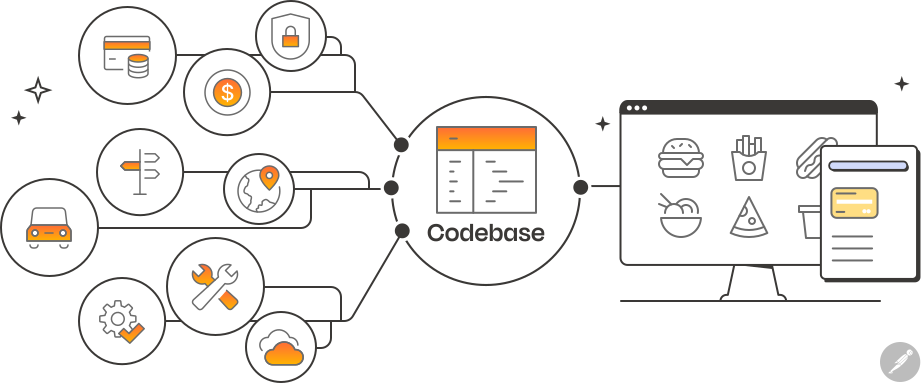
An API, or Application Programming Interface, is a set of rules that allows two software systems to communicate with each other. Think of it as a contract between your website and another platform: it defines what information can be shared, how it should be formatted, and what either side is allowed to request.
When someone places an order on your website and the order automatically appears in your accounting software, that is an API integration at work. When your CRM receives a new lead the moment a contact form is submitted, that is an API. When your logistics partner’s tracking number shows up inside your customer’s account page without anyone manually entering it, API integration makes that possible.
There are several common API types used in Singapore web projects:
- REST APIs: The most widely used standard. Data is exchanged in JSON format over HTTPS. Most modern SaaS platforms expose REST APIs.
- SOAP APIs: An older but still active standard, common in banking, insurance, and government systems in Singapore. More rigid but highly structured.
- GraphQL: A newer approach where the client specifies exactly what data it needs. Popular in complex data-heavy applications.
- Webhooks: Rather than your system asking for data, webhooks let external platforms push real-time updates to your website whenever a specific event occurs.
Why API Integration Matters for Singapore Businesses in 2026
Singapore consistently ranks among the world’s top digital economies. The Infocomm Media Development Authority (IMDA) has pushed hard for enterprise digitisation under programmes like SMEs Go Digital, and businesses that have adopted digital tools are now facing the next challenge: making those tools work together.
A Singapore retailer might be running Shopify for e-commerce, Xero for accounting, Klaviyo for email marketing, and Ninjavan for deliveries. Each platform is excellent on its own. Without API integration, however, staff are exporting spreadsheets and re-importing data, order statuses are delayed, and the customer experience is fragmented. With API integration, these systems share data automatically.
| Business Type | Common Integration Need | Business Outcome |
| E-commerce | Payment gateway + inventory + logistics | Automated order fulfilment |
| F&B / Hospitality | Reservation system + CRM + POS | Unified customer history |
| B2B / Corporate | CRM + ERP + website forms | Faster sales pipeline |
| Healthcare | Booking system + EMR + payment | Reduced admin errors |
| Logistics / Trading | Tracking APIs + WMS + portal | Real-time shipment visibility |
Table 1: Common API integration use cases for Singapore businesses. Source: iCreationsLAB project data.
See More: Web Design for Property Agents Singapore: How to Get More Leads Online (2026 Guide)
The Most Common Third-Party Systems Singapore Websites Connect To
1. Payment Gateways
Singapore businesses typically integrate with Stripe, PayNow via bank APIs, eNETS, PayPal, or Hitpay. Payment API integration allows your website to process transactions securely without storing sensitive card data on your own servers. For platforms operating under MAS regulations, choosing a payment partner with PCI-DSS compliance is non-negotiable.
2. CRM Systems
Salesforce, HubSpot, Zoho CRM, and Microsoft Dynamics are widely used by Singapore enterprises and SMEs. Connecting your website’s forms, chat tools, and e-commerce activity to your CRM means your sales team always has a complete view of every prospect and customer without manual data entry.
3. ERP and Accounting Platforms
Xero and QuickBooks are standard among Singapore SMEs. Larger companies often run SAP or Oracle ERP. Integrating your website with these systems means sales orders, invoices, and payment records synchronise automatically, reducing reconciliation errors and audit risk.
4. Logistics and Shipping APIs
Platforms like Ninjavan, J&T Express, DHL, and Singpost all provide APIs that allow your website to generate waybills, retrieve tracking data, and display live delivery status to customers. For cross-border e-commerce, integration with freight and customs APIs reduces the manual burden on operations teams.
5. Marketing and Communication Tools
Mailchimp, Klaviyo, Salesforce Marketing Cloud, and WhatsApp Business API are commonly integrated with Singapore websites. When a user completes a purchase or fills a form, the integration triggers automated onboarding sequences, reduces time to first contact, and improves lead conversion rates.
6. Government and Regulatory APIs
Singapore offers developer-friendly government APIs through the SingPass MyInfo ecosystem. For businesses in financial services, property, or HR, integrating MyInfo allows customers to auto-fill verified personal data during onboarding, reducing form abandonment and verification time significantly. The Corppass API serves similar functions for corporate entities.
How API Integration Works: A Step-by-Step Technical Overview
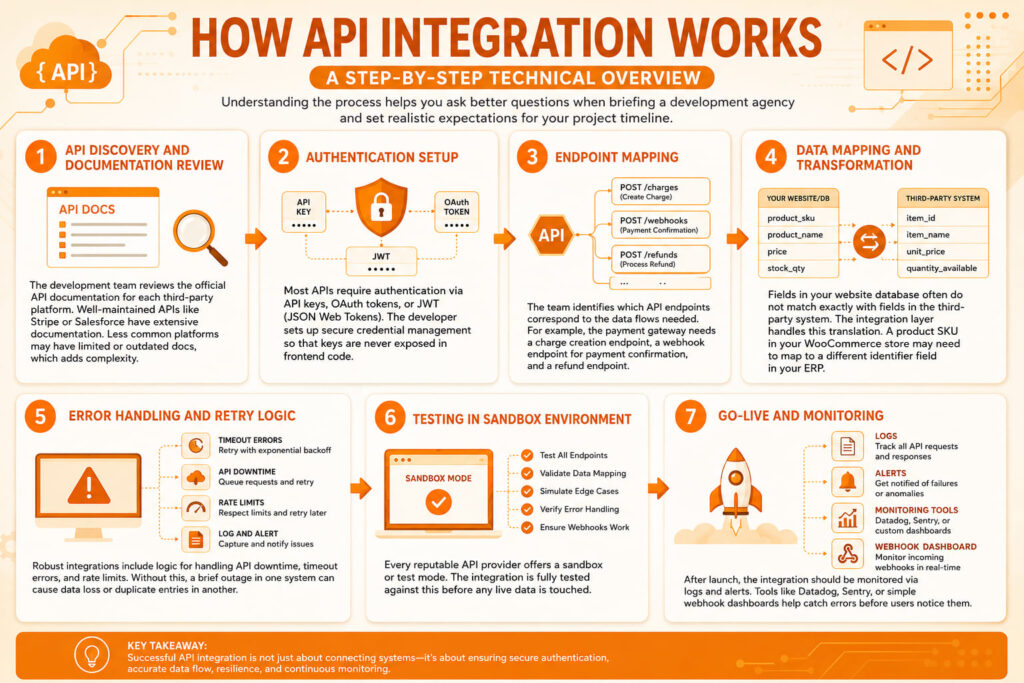
Understanding the process helps you ask better questions when briefing a development agency and set realistic expectations for your project timeline.
- API Discovery and Documentation Review: The development team reviews the official API documentation for each third-party platform. Well-maintained APIs like Stripe or Salesforce have extensive documentation. Less common platforms may have limited or outdated docs, which adds complexity.
- Authentication Setup: Most APIs require authentication via API keys, OAuth tokens, or JWT (JSON Web Tokens). The developer sets up secure credential management so that keys are never exposed in frontend code.
- Endpoint Mapping: The team identifies which API endpoints correspond to the data flows needed. For example, the payment gateway needs a charge creation endpoint, a webhook endpoint for payment confirmation, and a refund endpoint.
- Data Mapping and Transformation: Fields in your website database often do not match exactly with fields in the third-party system. The integration layer handles this translation. A product SKU in your WooCommerce store may need to map to a different identifier field in your ERP.
- Error Handling and Retry Logic: Robust integrations include logic for handling API downtime, timeout errors, and rate limits. Without this, a brief outage in one system can cause data loss or duplicate entries in another.
- Testing in Sandbox Environment: Every reputable API provider offers a sandbox or test mode. The integration is fully tested against this before any live data is touched.
- Go-Live and Monitoring: After launch, the integration should be monitored via logs and alerts. Tools like Datadog, Sentry, or simple webhook dashboards help catch errors before users notice them.
| Technical Note |
| For high-volume integrations, a middleware layer or iPaaS (Integration Platform as a Service) such as Zapier (for simple flows), Make (formerly Integromat), or enterprise solutions like MuleSoft or Boomi can reduce custom code requirements. However, for tight website integrations requiring custom business logic, a bespoke integration built into your codebase typically performs better and gives you more control over the data flow. |
Key Challenges in API Integration for Singapore Websites
Data Privacy and PDPA Compliance
The Personal Data Protection Act (PDPA) governs how Singapore businesses collect, use, and disclose personal data. When your website sends customer data to a third-party CRM or marketing platform, you need to ensure that data processing agreements are in place, that the receiving system is PDPA-compliant, and that your privacy policy accurately reflects what you share and why.
API Version Changes
Third-party platforms update their APIs regularly. A payment gateway may deprecate an old endpoint with 90 days notice. Without active maintenance, your integration can break silently. Building with version-specific endpoints and setting up change notifications from your API partners is critical.
Rate Limits
Most APIs enforce rate limits. Stripe, for example, allows up to 100 read operations per second for live mode requests. If your integration sends requests faster than this, you will hit 429 errors. Experienced developers build queue and retry logic to handle this gracefully.
Latency and User Experience
Slow API responses can freeze your website’s frontend. The best practice is to run API calls asynchronously or use background jobs so that page load times are not dependent on third-party response times. For payment flows, this needs particularly careful UX design.
Security Vulnerabilities
Improperly secured API keys, exposed webhook endpoints, or insufficient input validation can create serious security risks. Singapore’s Cyber Security Agency (CSA) guidelines recommend treating third-party API endpoints with the same scrutiny as internal services, including access control, IP whitelisting where possible, and regular credential rotation.
See More: Top 12 Web Design Companies in Singapore (2026 Guide)
Choosing the Right API Integration Partner in Singapore
Not every web agency has genuine API integration experience. Here is what to look for when evaluating a development partner:
- Experience with the specific platforms you need: An agency that has already integrated Xero, Salesforce, or Ninjavan will move faster and make fewer mistakes than one building that connection for the first time.
- Understanding of PDPA and data flow implications: Your partner should be asking about data handling, not just connection logic.
- Clear documentation deliverables: You should receive documentation of every integration built, including endpoint details, authentication methods, and error handling behaviour.
- Ongoing maintenance capability: APIs change. Your partner should offer a support or maintenance arrangement, not just a one-time build.
- Security practices: Ask how API keys are stored, how webhook endpoints are secured, and whether penetration testing is included for high-risk integrations.
| iCreationsLAB Insight |
| We regularly audit integrations built by other agencies and find the same issues: hardcoded API keys in frontend JavaScript (visible to anyone who inspects the page), no error handling for failed webhook calls, and no version pinning. These are not minor issues. A hardcoded API key can result in a data breach or fraudulent charges. When we take over a project, the first step is always a security and architecture review before we touch any functionality. |
API Integration vs Native Plugins: When to Use Which
Many Singapore website owners default to plugins when a platform offers one. WooCommerce has plugins for most payment gateways and shipping carriers. WordPress has plugins for HubSpot, Mailchimp, and countless other tools. Plugins are fast to deploy and often well-supported.
However, plugins have real limits:
- You depend on the plugin developer’s update cycle, which may lag behind API changes.
- Multiple plugins interacting can cause conflicts and unpredictable behaviour.
- Plugin-based integrations are rarely optimised for your specific business logic.
- For high-volume stores or complex data flows, plugin performance often degrades under load.
Custom API integration makes sense when your business logic is specific, when you need tight control over data handling, when performance under load matters, or when the plugin ecosystem does not cover your exact use case. Many growing Singapore businesses start with plugins and graduate to custom integrations when the limitations become apparent.
| Factor | Plugin Approach | Custom API Integration |
| Setup Speed | Hours to days | Days to weeks |
| Business Logic Flexibility | Limited | Fully customisable |
| Performance at Scale | Often poor | Optimised |
| Maintenance Dependency | Plugin vendor | Your development partner |
| PDPA / Security Control | Limited control | Full control |
| Total Cost (Long-term) | Lower upfront, higher hidden cost | Higher upfront, lower ongoing cost |
Table 2: Plugin vs custom API integration comparison. Relevant for Singapore SMEs evaluating their options.
Real-World API Integration Examples in Singapore
E-commerce with Multi-Carrier Logistics
A Singapore consumer electronics retailer was managing orders across Lazada, their own WooCommerce store, and a physical outlet. iCreationsLAB built a central integration layer that pulled orders from all channels into a unified dashboard, pushed fulfilment instructions to their 3PL partner’s WMS via API, and sent real-time tracking updates to customers through the website. Order processing time dropped from 40 minutes per order to under 5 minutes.
B2B Portal with Salesforce and SAP Integration
A Singapore-based industrial distributor needed their customer portal to show live pricing, inventory, and order history from their SAP ERP, with order placement flowing back into SAP and triggering Salesforce CRM records for account management. The integration reduced order entry errors by over 80% and gave their sales team full visibility into customer behaviour.
Healthcare Appointment Platform with MyInfo
A private clinic group in Singapore integrated the SingPass MyInfo API into their patient registration portal. Patients could pre-fill all personal and insurance information with a single tap on their SingPass app, reducing form completion time from six minutes to under one minute and significantly decreasing data entry errors during intake.
See More: Web Design Singapore for Startups: How to Launch Fast on a Tight Budget
Frequently Asked Questions: API Integration Singapore
How long does API integration typically take for a Singapore website?
A straightforward single-system integration, such as connecting a payment gateway to an existing WooCommerce store, can take three to five working days. A more complex multi-system integration involving a CRM, ERP, and logistics API can take four to twelve weeks, depending on the complexity of business logic and the quality of documentation available from the third-party platforms.
How much does API integration cost in Singapore?
Costs vary significantly by complexity. Simple integrations with well-documented platforms may start from SGD 1,500 to 3,000 for a custom build. Complex enterprise integrations involving multiple platforms, custom middleware, and ongoing support typically range from SGD 10,000 to 50,000 or more. Ongoing maintenance retainers are usually priced separately. Plugins are cheaper upfront but often generate hidden costs in performance, security, and maintenance over time.
Do I need technical knowledge to manage an API integration?
No. Once an integration is built and tested, it typically runs in the background with no manual input required. Your team interacts with the platforms themselves, not the integration layer. You do need a technical partner for monitoring, updates, and troubleshooting when API providers change their endpoints or authentication requirements.
What happens when a third-party API changes?
Most platforms announce breaking changes well in advance, typically 60 to 90 days. With a good development partner and active monitoring, updates are handled before any disruption occurs. If you manage the integration yourself without monitoring, changes can break silently and you may not notice until data stops syncing.
Is API integration covered under MAS or PDPA regulations in Singapore?
Directly, no. But indirectly, yes. When your integration moves personal data to a third-party platform, you are subject to PDPA obligations around data protection and disclosure. Financial institutions regulated by MAS must ensure that any third-party API integration involving customer financial data meets MAS Technology Risk Management Guidelines. These should be reviewed with your legal and compliance team before building integrations in regulated sectors.
When API Integration Is Not the Right Solution
API integration is powerful but not always necessary. For very small businesses with simple needs, a combination of native plugins and manual processes may be sufficient. If you process fewer than 50 orders per month and have a small team, the return on investment for a custom integration may not justify the cost.
Similarly, if the third-party platform you need to connect does not offer an API, or offers one with very limited functionality, integration may not be viable without a significant workaround. In such cases, alternatives like Zapier, Make, or even well-structured data exports may serve your needs adequately.
Finally, if your business processes are still changing rapidly, building a tight technical integration too early can create rigidity that slows you down. Sometimes the right answer is to stabilise your processes first, then integrate