
Rapidly evolving digital economy, a professional website is no longer a luxury—it is a mandatory requirement for business credibility. WordPress currently powers over 43% of all websites on the internet. But how do you leverage the power of WordPress specifically for the Singaporean market?
This guide will walk you through every step, from basic setup to advanced optimizations, to turn your WordPress site into a high-converting “sales machine.”
1. Why Should Singaporean Businesses Choose WordPress?
As a global financial and tech hub with world-class internet infrastructure, Singapore offers a unique environment for digital businesses. Using WordPress provides several strategic advantages:
- Scalability: Suitable for everyone from startups at Launchpad @ One-north to MNCs in the CBD.
- Multi-language Support: Easily set up sites in English, Mandarin, Malay, or Tamil to reach Singapore’s diverse demographic.
- Local Ecosystem: A vast pool of Singapore-based agencies and freelancers who specialize in WordPress.
- Cost-Efficiency: Significantly lower entry cost compared to custom-coded solutions, allowing for better allocation of marketing budgets.
See More: Shopify vs. WooCommerce: Which Is Better for Your Business?
2. Planning and Domain Registration in Singapore
Your journey begins with securing your digital “real estate.”
Choosing .SG vs. .COM
In Singapore, owning a .sg or .com.sg domain carries immense trust.
- Governance: These are managed by SGNIC (Singapore Network Information Centre).
- SEO Benefit: Google prioritizes local results. A .sg extension signals to search engines that your business is physically located and relevant to users in Singapore.
Hosting – Speed is Non-Negotiable
Singaporean users have high expectations; a delay of more than 3 seconds can lead to high bounce rates.
- Recommendation: Choose hosting providers with data centers located physically in Singapore (e.g., Vodien, Exabytes, or SiteGround Singapore).
- Why? Local servers reduce latency, improving your Core Web Vitals and overall SEO ranking.
Learn more about our website design services.
3. WordPress.com vs. WordPress.org: Which is Right for Your Business?
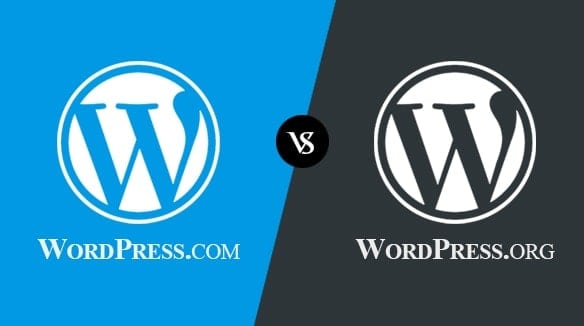
A common point of confusion for beginners is the difference between these two platforms. Think of it this way: WordPress.com is like renting an apartment (convenient but restricted), while WordPress.org is like owning the land and building your own house (total freedom but requires maintenance).
3.1. WordPress.com: The “Rented Apartment” (Managed Hosting)
This is a service platform run by Automattic.
- The Free Version: No hosting costs, but your domain will look like yourbusiness.wordpress.com.
- Limitations:
- Ads: WordPress may display their own ads on your site without your consent.
- No Plugins: You cannot install essential tools for SEO or PayNow unless you pay for expensive Business plans ($30-40 SGD/month).
- Ownership: You are subject to their terms; if they deem your content a violation, they can shut you down.
3.2. WordPress.org: The “Self-Owned House” (Self-Hosted)
This is the open-source software you install on your own local Singaporean hosting.
- The Paid Version (Setup via Hosting): The software is free, you only pay for your domain and hosting.
- Advantages for Business:
- Full Control: Install any plugin (WooCommerce, Elementor, Rank Math).
- Monetization: Integrate local payment gateways like PayNow or GrabPay.
- Better SEO: Access the “backend” to optimize speed and technical structure.
- Best For: Any serious business in Singapore aiming for long-term growth and digital asset ownership.
3.3. Quick Comparison Table
| Feature | WordPress.com (Free/Starter) | WordPress.org (Self-Hosted) |
| Software Cost | Free (but highly limited) | Free (Open Source) |
| Domain | Must use .wordpress.com | Your own .sg or .com |
| Plugin Installation | Not allowed (except top tiers) | Unlimited / Full Freedom |
| E-commerce | Requires expensive plans | Free via WooCommerce |
| Maintenance | Handled by WordPress | You or your Agency manage it |
| SEO Potential | Low | Very High |
See More: How Google Ranks Keywords: In-Depth Explanation of Ranking Factors
4. Setting Up WordPress for Business Standards
Once WordPress is installed via your hosting’s cPanel, you must optimize the basics:
Choosing a Theme
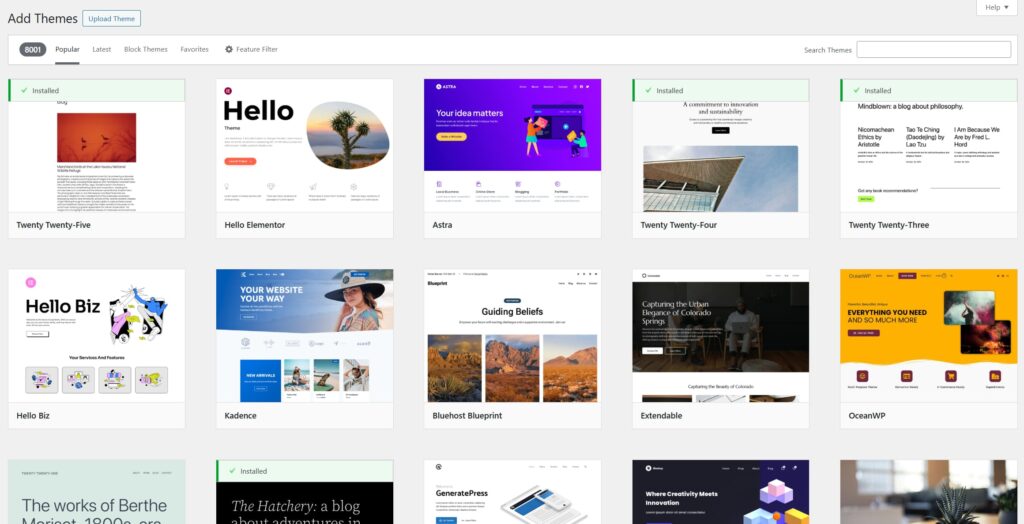
Avoid cluttered designs. Singaporean business aesthetics lean toward clean, modern, and professional layouts.
- Recommended Themes: Astra, GeneratePress, or Kadence.
- Mobile-First: Over 90% of Singaporeans access the web via smartphone. Your theme must be 100% responsive.
Essential Plugins for the SG Market
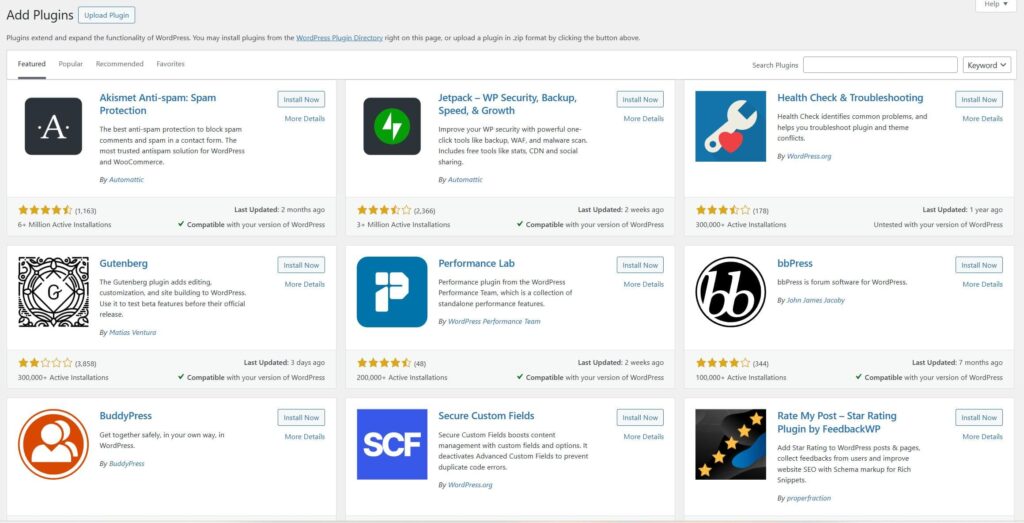
- Rank Math / Yoast SEO: For keyword optimization.
- WP Rocket: Crucial for page speed in Singapore.
- UpdraftPlus: Automated backups.
- Wordfence Security: To guard against regional cyber threats.
5. Integrating E-commerce and Local Payments
If you are selling products, WooCommerce is the gold standard. For Singapore, pay attention to:
Local Payment Gateways
Singaporeans prefer cashless and instant payments. Your site should include:
- Stripe & PayPal: For international and credit card payments.
- HitPay / PayNow: This is the national payment method. Integrating a PayNow QR code significantly increases conversion rates for local buyers.
- GrabPay / ShopeePay: Popular mobile wallets in the region.
GST (Goods and Services Tax)
As of 2024, the GST rate in Singapore is 9%. Ensure your WooCommerce tax settings are configured to calculate this accurately for your invoices.
6. Content Strategy and SEO for Singapore
Local Keyword Research
Don’t just target “Business Consulting.” Target “Business Consulting services in Singapore” or “SME accounting Singapore.” Local intent is what drives high-quality leads.
PDPA Compliance
Singapore has strict data protection laws (Personal Data Protection Act). Your WordPress site must:
- Have a clear Privacy Policy page.
- Include a Cookie Consent banner.
- Ensure all contact forms are encrypted (SSL).
See More: Best Web Developer Singapore | Build Fast, Secure & SEO-Friendly Websites
7. Security and Maintenance
Singapore is a frequent target for cyber-attacks in Southeast Asia.
- Regular Updates: Keep WordPress core, themes, and plugins updated.
- SSL Certificate: An “HTTPS” prefix is mandatory to build trust with local consumers.
- 2FA: Use Two-Factor Authentication for all admin logins.
Looking for a professional website that converts visitors into customers?
Our team provides professional website design services in Singapore tailored to your business goals.
Contact us to schedule a free consultation and explore the right solution for your brand.
How much does a WordPress business website cost in Singapore?
Costs for a WordPress business website in Singapore typically range from SGD 800 to SGD 5,000 for initial setup, depending on features and provider. Ongoing annual expenses add SGD 200 to SGD 1,000 for hosting, domain, and maintenance.
Setup Costs
Basic business sites with 4-6 pages (Home, About, Services, Contact, Blog) cost SGD 800–2,000 one-time from freelancers or agencies. Small business WordPress sites generally fall between SGD 1,000–5,000, rising with custom designs or integrations.
Ongoing Costs
Annual hosting ranges from SGD 100–400 for shared plans to SGD 300–1,000 for managed WordPress hosting. Domain registration costs SGD 15–60 yearly, while maintenance starts at SGD 100 monthly for basic support.
Cost Breakdown
| Component | Typical Range (SGD) |
| Domain | 15–60/year |
| Hosting | 100–1,000/year |
| Theme/Design | 0–150 one-time (premium) |
| Plugins | 50–300/year |
| Maintenance | 1,200–3,600/year |
Factors Affecting Price
Complexity like custom features increases costs to SGD 6,000–15,000+. Hiring agencies (SGD 2,500+) costs more than freelancers (SGD 1,000–3,000). Singapore-based teams charge higher due to local rates but offer better speed with regional hosting.
Are there any government grants available for building a website?
Yes, Singapore offers government grants that can help offset website development costs for businesses, particularly SMEs. Key options include the Productivity Solutions Grant (PSG) and Enterprise Development Grant (EDG), which may cover up to 50% of eligible expenses.
Relevant Grants
The PSG supports pre-approved IT solutions, including website builders, with up to SGD 30,000 in funding and 50% cost coverage for productivity tools like e-commerce or CMS platforms such as WordPress. EDG funds business upgrades and innovation projects up to 50% (or 70% for sustainability until March 2026), though it excludes direct website production—focus on related diagnostics or automation instead.
Eligibility Basics
Businesses must be Singapore-registered SMEs with at least 30% local equity and apply via the Business Grants Portal before committing funds. Apply early, as claims are reimbursement-based after project completion.
Application Tips
Use the official Business Grants Portal at businessgrants.gov.sg to check PSG-eligible solutions and submit proposals. Consult Enterprise Singapore or grant advisors for tailored advice, as up to 50% website cost coverage is possible through matching schemes.
See More: Website Design Price Guide 2025 | How Much Does It Really Cost?
Do I need to register my website with IMDA?
No, standard business websites do not require registration with Singapore’s Infocomm Media Development Authority (IMDA). Registration applies only to specific cases like political or religious content related to Singapore, telecom equipment, or broadcasting services.
Standard Business Sites
Ordinary commercial WordPress sites for services, products, or portfolios face no IMDA registration mandate. IMDA focuses on regulated sectors, not general web hosting or content.
When Registration Applies
Class licences cover websites with political/religious Singapore content (individuals/groups use Form B/D, within 14 days of launch). Telecom/radio equipment sellers need Equipment Registration (ESER/SER/GER) via GoBusiness.
Exemptions and Advice
Prohibited equipment like scanning receivers is banned; standard servers/hosting are exempt. Verify content type on IMDA’s site or consult if unsure about niche topics.
Should I use WordPress.com or WordPress.org?
For a business website, choose WordPress.org over WordPress.com due to its superior flexibility, customization, and monetization options. WordPress.org is self-hosted software that’s free but requires separate hosting, ideal for growth-oriented sites. WordPress.com offers managed hosting with limitations on plugins and themes unless on premium plans.
Key Differences
| Feature | WordPress.com | WordPress.org |
| Hosting | Included (managed) | Self-hosted (arrange own) |
| Customization | Limited (plugins on paid) | Full (all plugins/themes) |
| Cost | Free limited; $8+/month paid | Free software; hosting ~SGD 100+/year |
| Monetization | Restricted | Unlimited (e.g., WooCommerce) |
| Best For | Simple blogs | Business sites |
Business Recommendation
WordPress.org suits Singapore businesses needing SEO tools, e-commerce, and scalability without platform locks. Pair with local hosting for compliance and speed; costs align with earlier estimates (SGD 800+ setup). Opt for .com only for quick, low-maintenance personal sites.
How do I integrate PayNow into WordPress?
For a Singapore business website, integrate PayNow into WordPress using WooCommerce plugins from providers like HitPay or similar gateways, as direct PayNow lacks a native plugin but works via QR code generation. This suits e-commerce setups on WordPress.org. Expect a 15-minute setup after account verification.
Prerequisites
Create a HitPay account at hitpayapp.com/sg, complete KYC with business docs, and enable PayNow in the dashboard. Activate WooCommerce sales channel for seamless integration. Ensure your site uses WordPress.org with WooCommerce installed.
Setup Steps
- Log into WordPress admin, go to Plugins > Add New, search “HitPay”, install and activate the plugin.
- Enter HitPay API keys from your dashboard into WooCommerce > Settings > Payments > HitPay.
- Enable PayNow as a payment option; customers see a QR code at checkout to scan via banking apps.
Alternatives
Use Razorpay for PayNow alongside cards/wallets, or static QR plugins like SG PayNow QR for non-WooCommerce sites. Fees vary (e.g., 0% on some direct plugins); test in sandbox mode first.
Is WordPress secure?
WordPress is secure when properly maintained, powering over 40% of websites with built-in protections and extensive plugins, but its popularity makes it a target requiring proactive steps.
Core Security Features
WordPress includes user role management, secure authentication, and automatic updates for core files to patch vulnerabilities quickly. HTTPS enforcement via SSL and protections against SQL injection or XSS are standard with modern setups.
Common Risks and Mitigations
Brute force attacks and malware affect outdated sites; counter with 2FA, login attempt limits, and real-time scanners like Wordfence or Sucuri. Enable file integrity monitoring and auto-updates for plugins/themes to block 90% of threats from weak access or old software.
Best Practices for Businesses
For Singapore sites, pair WordPress.org with managed hosting offering firewalls and backups; avoid nulled plugins and scan weekly. This keeps risks low, aligning with prior cost and PayNow integration advice.