
Singapore has consistently ranked as one of the world’s top digital economies, and its e-commerce sector is no exception. With over 90% internet penetration and a tech-savvy population of 5.9 million, the Lion City is one of Southeast Asia’s most lucrative markets for online retail. If you are a local business owner looking to tap into this opportunity, Shopify is the platform that thousands of Singapore merchants trust — and for very good reason.
This guide is written by the team at iCreationsLAB, a Shopify-certified agency based in Singapore with years of hands-on experience helping local SMEs, startups, and enterprise brands build profitable online stores. Whether you are selling artisan food, fashion, electronics, or B2B services, this complete 2026 setup guide will walk you through every step — from legal registration to advanced marketing.
1. Why Singapore Businesses Choose Shopify in 2026
Singapore’s e-commerce market generated over SGD 8 billion in revenue in 2025 and is on track to surpass SGD 10 billion by 2027. Within this landscape, Shopify has emerged as the go-to platform for businesses of all sizes — from one-person operations selling handmade goods to established brands managing multiple storefronts.
The Singapore E-Commerce Opportunity
Several macro trends make this the ideal time to launch on Shopify in Singapore:
- Mobile-first shoppers: A large share of Singapore consumers shop on their smartphones, and Shopify’s themes are optimised for mobile out of the box.
- Strong consumer trust: Singaporeans are among the most active online shoppers in ASEAN.
- Government support: Initiatives like the SMEs Go Digital Programme and Enterprise Development Grant (EDG) actively subsidise digital transformation for local businesses.
- Cross-border opportunity: Singapore’s free-trade agreements and world-class logistics infrastructure make it a natural launchpad for regional expansion into Malaysia, Indonesia, Thailand, and beyond.
Why Shopify Outperforms the Alternatives
| Feature | WooCommerce |
| Shopify | WooCommerce |
| Fully hosted — no server management | Self-hosted — requires technical upkeep |
| Shopify manages hosting and uptime for you | Uptime depends on your hosting provider |
| Built-in payment processing | Requires third-party plugin + gateway setup |
| 24/7 customer support | Community forums; no official support |
| Scales from SME to enterprise | Performance degrades without optimisation |
| App ecosystem: 8,000+ apps | Plugin ecosystem: 50,000+ (quality varies) |
Shopify’s hosted infrastructure, world-class security (PCI DSS Level 1 certified), and intuitive admin panel make it the lowest-friction path to a professional online store — especially for business owners without deep technical expertise.
See More: Shopify vs. WooCommerce: Which Is Better for Your Business?
2. Legal Requirements Before You Launch
Before you begin configuring your Shopify store, you need to ensure your business is legally compliant in Singapore. Skipping this step can result in fines, account suspension, or operational disruptions.
Business Registration with ACRA
All businesses selling goods or services in Singapore must be registered with the Accounting and Corporate Regulatory Authority (ACRA). For most e-commerce merchants, the relevant entity types are:
- Sole Proprietorship: Simplest structure, suitable for freelancers and very small operations. Registration fee: SGD 115.
- Private Limited Company (Pte. Ltd.): Recommended for growth-focused businesses. Provides limited liability, better credibility, and access to corporate grants. Registration from SGD 315.
- Limited Liability Partnership (LLP): Suited for professional partnerships.
Registration is done online through the BizFile+ portal and typically takes 1–3 business days. You will need a local director who is a Singapore citizen, PR, or Employment Pass holder.
Licences & Permits
Depending on your product category, additional licences may be required:
- Food and beverage products: Singapore Food Agency (SFA) licence
- Health supplements and cosmetics: Health Sciences Authority (HSA) approval
- Alcohol: Singapore Tourism Board (STB) liquor licence
- Electronics and electrical goods: SAFETY Mark certification from Enterprise Singapore
See More: Next.js vs WordPress for Businesses: Which Is Faster & More SEO-Friendly?
3. Choosing the Right Shopify Plan
Shopify offers several pricing tiers, and selecting the right one from the start will save you from costly migrations later. Here is how the plans break down for Singapore businesses in 2026 (prices in USD, billed annually):
| Plan | Price | Best For |
| Basic Shopify | USD 29/month | Solo founders, first-time merchants, low-volume stores |
| Shopify | USD 79/month | Growing businesses with a small team, moderate order volume |
| Advanced Shopify | USD 299/month | Scaling businesses needing custom reports and third-party calculated shipping |
| Shopify Plus | From USD 2,300/month | Enterprise brands with high volume, complex requirements, and dedicated support |
For most Singapore SMEs launching their first store, the standard Shopify plan (USD 79/month) hits the sweet spot — it includes gift cards, professional reports, and lower transaction fees compared to Basic. If you intend to grow aggressively within 12 months, starting at Advanced can save you on per-transaction fees at scale.
Transaction Fees: An Important Consideration
Shopify charges a transaction fee on every order processed through a third-party payment gateway (i.e., not Shopify Payments). Shopify Payments availability depends on your business location, so check Shopify’s current list of supported countries; merchants who use third-party gateways such as Stripe or HitPay pay this fee. The rate depends on your plan (it is lower on higher plans), and Shopify can change it, so confirm current rates on Shopify’s pricing page. At scale, these fees can represent a significant cost — a key reason why some high-volume merchants move to Shopify Plus, where third-party gateway fees are lower.
See More: 10 Best Website Development Companies in Singapore (2026 Ranking)
4. Setting Up Your Shopify Store: Step-by-Step
Once you have chosen your plan, the setup process is straightforward. Here is a practitioner’s walkthrough tailored for Singapore merchants:
Step 1: Account Creation & Store Basics
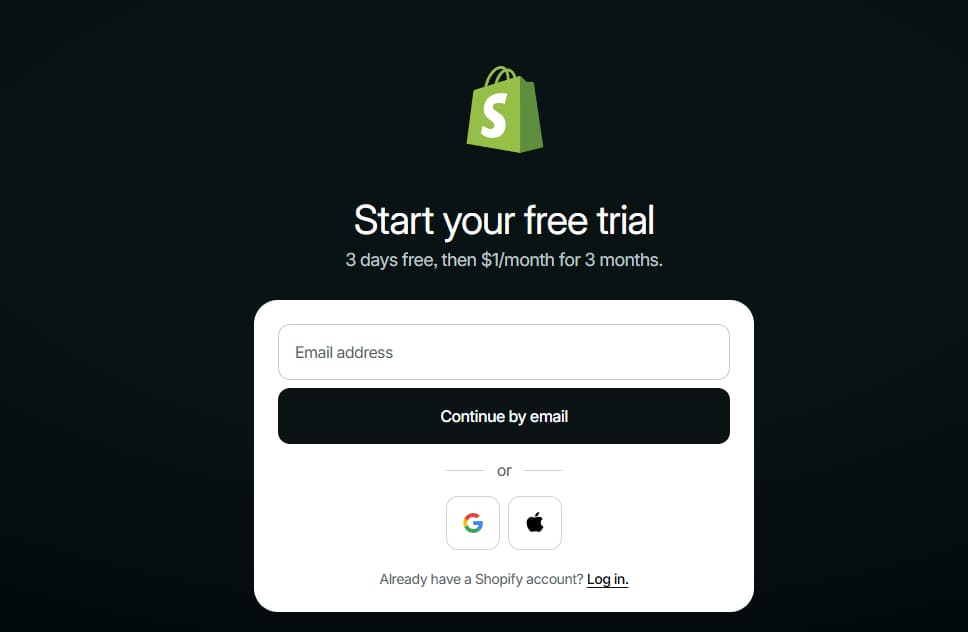
- Go to shopify.com and start your free 3-day trial (no credit card required).
- Enter your store name — this will form your default myshopify.com subdomain. You can connect a custom .com.sg or .sg domain later.
- In Store Settings > General, set your Store Currency to SGD (Singapore Dollar) and your Timezone to Singapore Standard Time (SST, UTC+8).
- Set your Unit System to Metric (kilograms and centimetres) for local shipping accuracy.
Step 2: Choose and Customise Your Theme
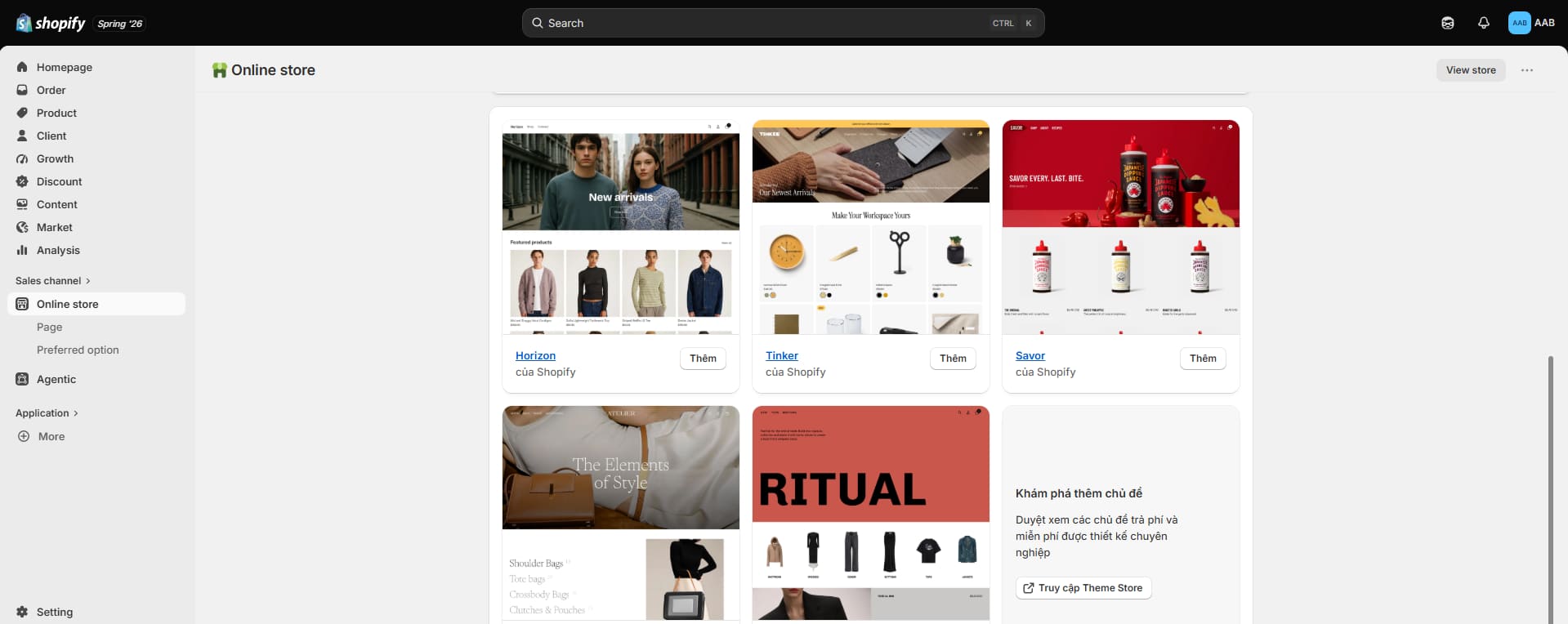
Your theme is your shopfront. Shopify’s free themes (Dawn, Craft, Sense) are clean, fast, and mobile-ready. For a more distinctive brand presence, premium themes from the Shopify Theme Store range from USD 180–380 and offer advanced features like multi-column menus, lookbooks, and countdown timers.
- Use the Theme Editor (Online Store > Themes > Customize) to upload your logo, set brand colours, and configure typography — no coding required.
- Ensure your theme passes Google’s Core Web Vitals test before going live. iCreationsLAB can perform a technical audit if needed.
Step 3: Add Your Products
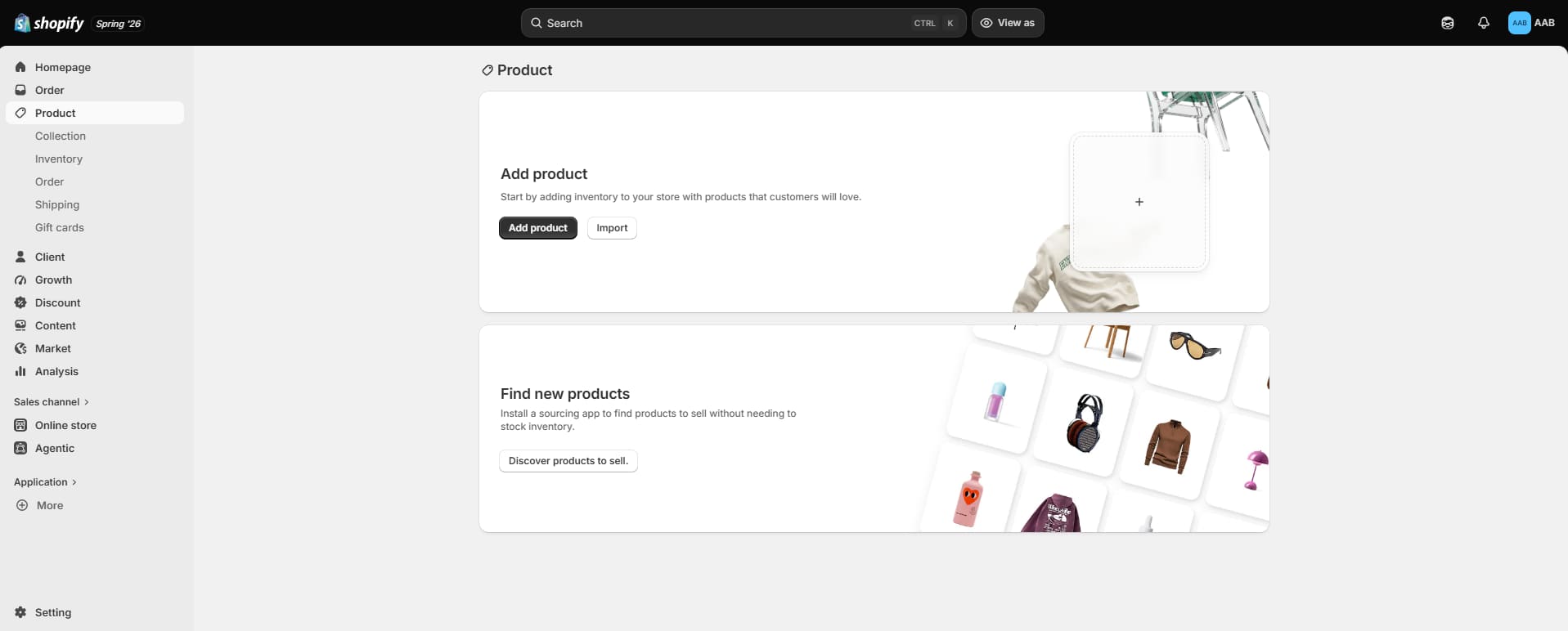
- Navigate to Products > Add Product. Complete all fields: title, description, price, compare-at price (for sale items), SKU, barcode, weight, and inventory tracking.
- Write SEO-optimised product descriptions — include your target keyword naturally in the first 100 words, and fill in the SEO Title and Meta Description fields at the bottom of each product page.
- Upload high-quality images (at least 2048x2048px). Shopify will compress them automatically, but starting with high resolution ensures they look sharp on retina displays.
- Use product tags and collections to organise your catalogue and enable smart filtering.
Step 4: Configure Shipping Zones
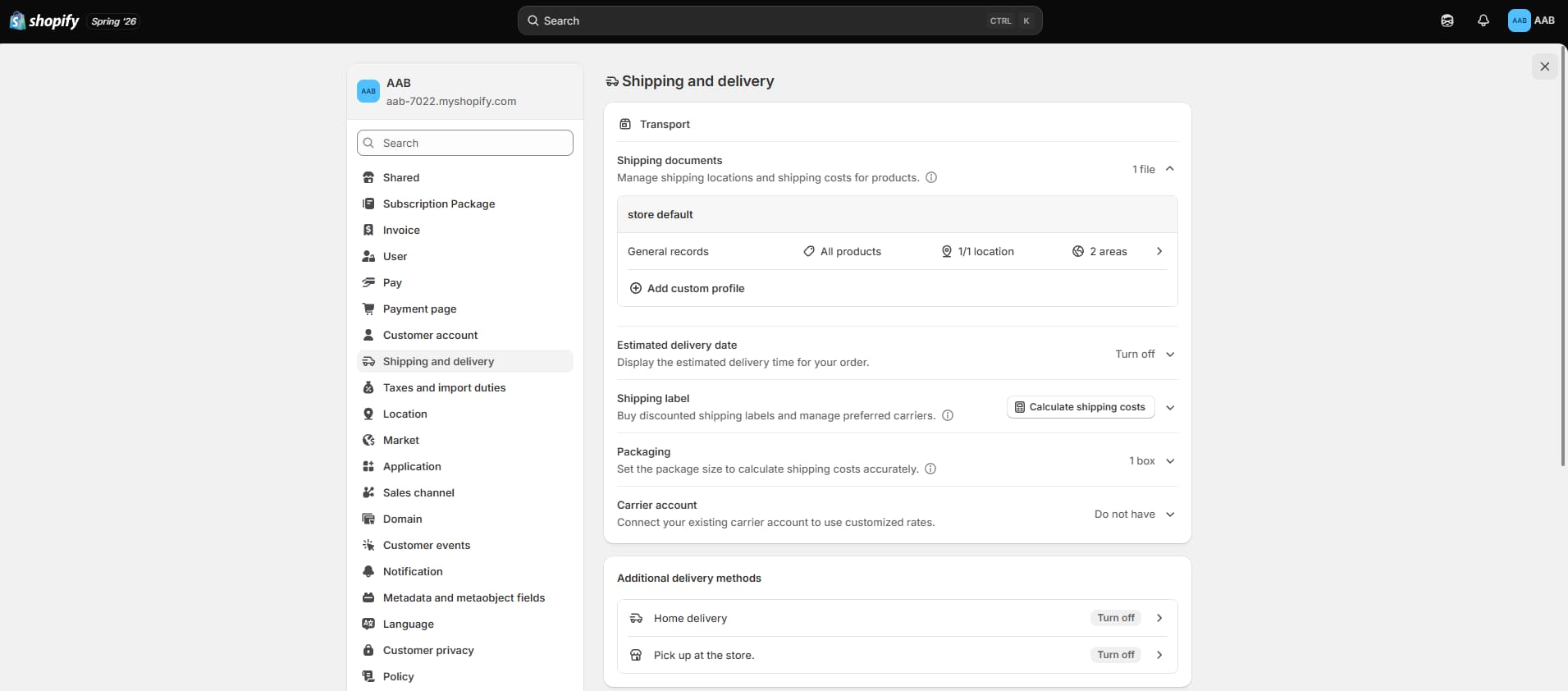
Go to Settings > Shipping and Delivery. Create shipping zones for:
- Singapore (Local): Offer flat-rate, free-shipping-over-threshold, or weight-based rates.
- Malaysia & Southeast Asia: Configure regional rates.
- Rest of World: Add international zones as needed.
For Singapore deliveries, consider integrating with local couriers such as Ninja Van, J&T Express, or Qxpress directly through Shopify apps for real-time rate quotes.
Step 5: Connect Your Domain
- Purchase a .com.sg or .sg domain through SGNIC (Singapore Network Information Centre) or a domain registrar like Namecheap.
- In Shopify, go to Online Store > Domains > Connect Existing Domain and follow the DNS configuration instructions.
- Enable SSL (free with Shopify) to secure your store and build customer trust.
See More: Top 12 Web Design Companies in Singapore (2026 Guide)
5. Payment Gateways for Singapore Merchants
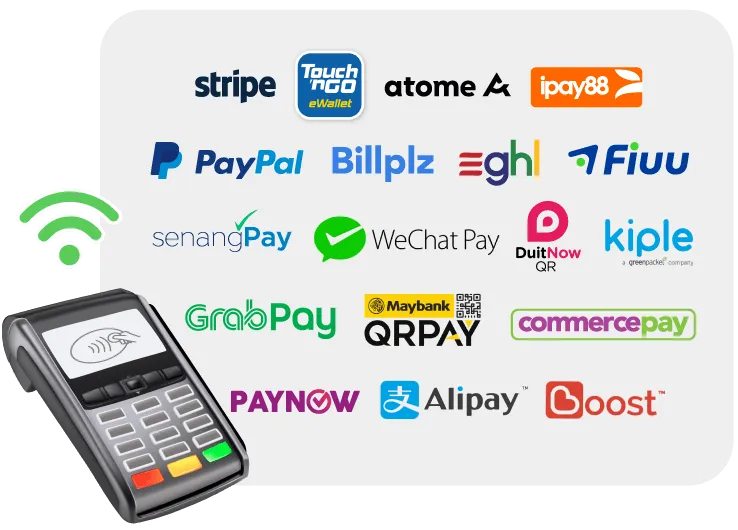
As noted earlier, Shopify Payments is not currently available in Singapore, which means you must integrate a third-party payment gateway. Here are the most popular and reliable options for Singapore businesses:
| Gateway | Methods Supported | Best For |
| Stripe | Visa, Mastercard, PayNow, Apple Pay, Google Pay | Lowest fees, best developer tools, PayNow QR support |
| PayPal | PayPal balance, cards, BNPL | High consumer trust, especially for cross-border orders |
| Adyen | All major cards, local wallets | Best for enterprise/high-volume merchants |
| HitPay | PayNow, NETS, cards, GrabPay | Built for Singapore; excellent local payment method coverage |
| GrabPay | GrabPay wallet | Popular with younger demographics; loyalty points incentive |
Our Recommendation: Stripe + HitPay
For most Singapore merchants, we recommend running Stripe as your primary gateway (for cards, Apple Pay, and Google Pay) alongside HitPay for PayNow QR code payments. PayNow is ubiquitous in Singapore — most consumers expect to see it as a checkout option. This dual-gateway approach typically lifts checkout conversion by 12–18% compared to card-only setups.
6. GST Compliance on Your Shopify Store
GST (Goods and Services Tax) compliance is a critical consideration for Singapore e-commerce businesses. Getting it wrong can result in penalties from the Inland Revenue Authority of Singapore (IRAS).
When Must You Register for GST?
You must register for GST if your taxable turnover exceeds SGD 1 million for the past 12 months, or if you reasonably expect it to exceed SGD 1 million in the next 12 months. Voluntary registration is also available for businesses below this threshold.
From 2024, Singapore extended its Overseas Vendor Registration (OVR) rules, requiring foreign digital service and low-value goods providers selling to Singapore consumers to register for GST if they meet the threshold.
Configuring GST on Shopify
- In Shopify, go to Settings > Taxes and Duties > Singapore.
- Enter your GST registration number once registered with IRAS.
- Enable “Include tax in prices” if you want to display GST-inclusive prices (recommended for B2C retail in Singapore).
- For B2B sales, you may prefer to show prices exclusive of GST and add it at checkout.
- Use Shopify’s tax override feature for zero-rated or exempt goods (e.g., basic food items, prescription drugs).
| Important Note Shopify’s built-in tax engine handles most scenarios for Singapore-based transactions, but cross-border sales — especially under the Low-Value Goods (LVG) rules — require careful configuration. iCreationsLAB’s GST compliance service includes a full audit of your tax settings and ongoing monitoring as IRAS updates its regulations. |
See More: Web Design for Law Firms Singapore: Building Trust Online
7. Shipping, Fulfilment & Logistics in Singapore
Singapore’s geography — a compact city-state of 733 km² — makes local logistics relatively straightforward. However, the bar for delivery expectations is high: a significant proportion of Singapore consumers expect same-day or next-day delivery as standard.
Local Courier Partners
- Ninja Van: Largest last-mile network in Singapore; strong API and Shopify integration; competitive bulk rates.
- J&T Express: Popular for cross-border shipping into Malaysia and Indonesia.
- Qxpress: Good for SME budgets; dedicated Shopify app available.
- Lalamove: On-demand same-day delivery; ideal for large or fragile items.
- SingPost: Cost-effective for low-weight items and international standard mail.
3PL and Warehousing
If you are managing significant inventory or scaling rapidly, consider engaging a third-party logistics (3PL) provider. Companies like Ezbuy Fulfilment, vFulfill, and Amazon Multi-Channel Fulfilment offer Singapore-based warehousing, pick-and-pack, and shipping integration with Shopify. This frees you from managing stock and allows you to focus on growth.
Packaging Compliance
Singapore’s Resource Sustainability Act requires producers and importers of packaged goods to register with the National Environment Agency (NEA) and report packaging data. If your annual turnover exceeds SGD 10 million and you supply more than 50 tonnes of packaging annually, extended producer responsibility (EPR) obligations may apply. Consult your corporate secretary for current thresholds.
8. Local SEO & Marketing Strategy
Building your store is only half the battle. Driving qualified traffic — particularly from Singapore-based shoppers — requires a deliberate SEO and marketing strategy.
On-Page SEO Essentials
- Homepage title tag: Include your primary keyword (e.g., “Premium Skincare Singapore | YourBrand”) within 60 characters.
- Product page SEO: Each product should have a unique meta description (120–160 characters) and an SEO-optimised title that naturally includes the product name and a Singapore-relevant modifier where appropriate.
- URL structure: Shopify auto-generates URLs from product titles. Keep them clean and descriptive: /products/organic-green-tea-singapore rather than /products/sgt-001.
- Image alt text: Every product image should have descriptive alt text for accessibility and image search indexing.
- Schema markup: Use Shopify apps like JSON-LD for SEO to implement Product, BreadcrumbList, and Organisation schema.
Google My Business & Local Search
Even as an e-commerce business, claiming and optimising your Google Business Profile is valuable for appearing in local search results. Include your Singapore address, business hours, and high-quality photos. Positive reviews from Singapore customers signal local relevance to Google’s algorithm.
Social Commerce in Singapore
Singapore consumers are highly active on Instagram, TikTok, and Facebook. Shopify’s native integrations with Meta (Facebook & Instagram Shopping) and TikTok Shop allow you to sync your product catalogue and run shoppable ads directly from your Shopify admin. TikTok Shop in particular has seen explosive growth in Singapore, with local creators driving significant product discovery.
Email Marketing & CRM
Email marketing delivers the highest ROI of any digital channel for Singapore e-commerce. Use Shopify Email (included in all plans) for basic campaigns, or connect Klaviyo or Mailchimp for advanced segmentation, automated flows (welcome series, abandoned cart, post-purchase), and deep analytics. Build your list from day one — every checkout should capture the customer’s email with explicit consent under Singapore’s Personal Data Protection Act (PDPA).
See More: Website Design Cost in Singapore: Complete Pricing Guide
9. Shopify Apps Every Singapore Merchant Needs
The Shopify App Store offers over 8,000 apps. Here are the ones our team at iCreationsLAB considers essential for Singapore operations:
| App | Purpose |
| HitPay | Payment gateway with PayNow QR, NETS, GrabPay |
| Ninja Van Shipping | Real-time shipping rates and label printing for Singapore |
| Klaviyo | Advanced email and SMS marketing automation |
| Loox | Photo and video review collection — boosts social proof |
| ReConvert | Post-purchase upsell to increase average order value |
| JSON-LD for SEO | Structured data markup for better Google visibility |
| Langify / Translate & Adapt | Multilingual support (English, Mandarin, Malay, Tamil) |
| BeProfit | Profit analytics dashboard with COGS tracking |
| Tidio Live Chat | Real-time chat and AI chatbot for customer support |
| Omnisend | Omnichannel marketing: email, SMS, push notifications |
10. Common Mistakes Singapore Merchants Make (And How to Avoid Them)
After working with over 100 Singapore merchants, the iCreationsLAB team has seen the same mistakes repeated again and again. Here is how to get ahead of them:
Mistake 1: Skipping Mobile Optimisation
Most Singapore shoppers browse and buy on mobile. Yet many merchants spend hours perfecting their desktop layout and neglect the mobile experience. Always preview your store on multiple device sizes before launching, and prioritise mobile load speed — aim for under 3 seconds on a 4G connection.
Mistake 2: Ignoring PDPA Compliance
Singapore’s Personal Data Protection Act (PDPA) mandates that businesses obtain explicit consent before collecting personal data and provide a clear privacy policy. Shopify has a built-in Privacy Policy template generator, but it should be reviewed and customised by a legal professional familiar with Singapore law. Failure to comply can result in fines of up to SGD 1 million.
Mistake 3: Underestimating Customer Service
Singapore consumers have high expectations for post-purchase support. Failing to respond to enquiries within a few hours can result in negative reviews that significantly impact conversion. Set up automated response emails, a clear returns policy, and a live chat tool from day one.
Mistake 4: Choosing the Wrong Theme for Your Product Type
A theme designed for fashion may not work well for electronics or food. Before selecting your theme, map out your customer journey and ensure the theme supports the features you need — size selectors, nutrition tables, digital downloads, or subscription billing, for example.
Mistake 5: Not Tracking Properly from Day One
Many merchants set up Google Analytics and Meta Pixel only after they start getting traffic — by which time they have lost weeks of data. Install Google Analytics 4, Google Tag Manager, Meta Pixel, and TikTok Pixel before you launch. Connect Google Search Console to monitor indexing and search performance from day one.
Conclusion: Your Shopify Singapore Journey Starts Here
Launching a Shopify store in Singapore in 2026 is one of the smartest business moves you can make. The market is large, digitally sophisticated, and growing. The platform is mature, powerful, and supported by a rich ecosystem of local payment gateways, courier integrations, and marketing tools. And the regulatory environment, while requiring careful attention, is clear and manageable with the right guidance.
Whether you are starting from scratch or migrating an existing store, the steps in this guide give you a solid foundation. But there is a significant difference between a store that works and a store that thrives — and that difference often comes down to experience, strategic setup, and ongoing optimisation.